
What you will get
An understanding of the routine that changes the most on your screen without anyone asking — and its rule, which is simpler and harsher than most people expect.
The rule, with no middle ground
Every open instalment whose due date is before today becomes Overdue.
That is all. No tolerance, no grace, no configurable exception.
It applies to every payment method — card included, whose instalment now has a due date: three days after the enrolment, or after the billing start date when that is later.
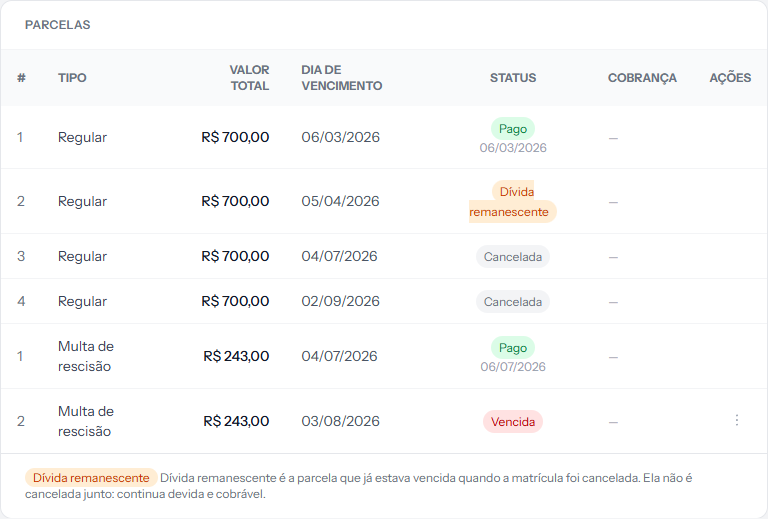 The instalment fell due on the 3rd and woke up on the 4th with the red overdue label. The screenshot is from the Portuguese panel; the layout is the same in English.
The "Days to mark as overdue" field in Settings does not change this. Its name suggests a grace period that does not exist. What that field actually controls is something else — loss of access to the class environment. Logged for correction, and the Billing tab article explains it.
What the routine fires alongside
When it marks an instalment, it also:
- Sends the arrears notice to the student, subject Instalment overdue.
- Sends the daily report to the school owner, with the count in the subject.
- Suspends the student in the class environment, if the school uses that integration and the arrears passed the configured number of days.
What it never touches
- Paid, waived or cancelled instalments. Only open ones qualify.
- Instalments with no due date — the case of older card instalments, created when card payments had no due date yet.
- Instalments already marked overdue. Each is marked once; there is no daily repeat notice.
- Schools whose EduPay subscription was cancelled or has ended. The routine skips the whole school: no marking, no arrears notice, no report and no suspension in the class environment on its behalf.
That last one matters operationally: the student gets one arrears notice per instalment, not one per day. Chasing whoever is already in arrears is human work.
The hour
01:00, in your school's timezone. It is deliberately the first of the four daily routines: by the time charge issuing runs at 06:00, statuses are already up to date.
Why the label matters
Overdue is what feeds the arrears panel, the reports and the collection lists. While an instalment stays Open, it appears in none of those places — even if its due date passed yesterday.
If something goes wrong
The student paid yesterday and woke up overdue. The payment landed after 01:00. Register the payment: the label corrects itself. The notice has already gone and cannot be recalled.
An overdue instalment was not marked. Check that it is genuinely Open — an instalment with no charge issued is still marked, but a waived or cancelled one is not.
The school wanted to allow three days' slack. There is no such setting today. The alternative is adjusting the instalments' due day.
Reviewed on · view as plain text