
What you will get
The two numbers the automatic routines read every day, adjusted — and a clear idea of what each one costs if it is wrong.
The path is Settings › Billing.
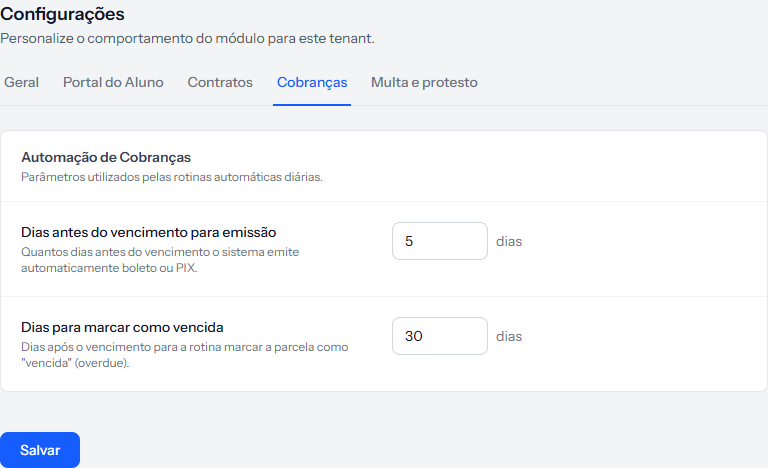 The whole tab fits on one screen: two fields and a button. The panel is called Billing Automation. The screenshot is from the Portuguese panel; the layout is the same in English.
Days before due date to issue
How many days before the due date the system automatically issues the boleto or PIX.
Accepts 1 to 30.
This is the number that decides when the charge reaches the student. Too short and it arrives at the last minute, so they miss it for lack of time. Too long and it gets buried in the inbox before the due date arrives.
Five to seven days is where most schools settle — long enough to see, plan and pay without it becoming urgent.
Days to mark as overdue
Accepts 1 to 365 — and this field does not do what its name says.
An instalment becomes overdue the day after its due date, always, with no tolerance at all. That behaviour depends on neither this field nor any other; it is fixed. Putting 30 here does not give the student thirty days of grace.
What the number actually controls is when the student loses access to the class environment because of the arrears — and only when the school uses the class environment integration and the cohort is linked to it.
| What happens | |
|---|---|
| Instalment becomes overdue | The day after the due date, always |
| Student loses class access | After the number of days in this field |
| School with no class environment linked | The field does nothing |
The label and the hint on this screen are wrong, and the hint even shows the internal word
overduein quotes. Logged for correction. Until then, read the field as "days of arrears before the student loses class access".
In practice: if the school does not use a linked class environment, this field can be left as it is. It changes nothing about billing.
What is not on this tab
The receiving service — the account that actually issues the charge — is not configured here. It lives under Integrations, which is its own subject.
Worth knowing, because the tab is called "Billing" and the natural expectation is to find everything about billing on it.
How you know it worked
The page returns to the Billing tab with the green banner and the new numbers in both fields.
If something goes wrong
The field is refused. The first accepts 1 to 30; the second, 1 to 365. Both are required — neither can be left blank.
I changed the lead time and nothing happened today. Issuing is done by the daily routine. The new number applies from its next run.
Reviewed on · view as plain text