
What you will get
The school's identity filled in with a clear idea of where each field will appear — in the student portal, in the contract, or in both.
The path is Settings › General.
The fields, and where each one shows up
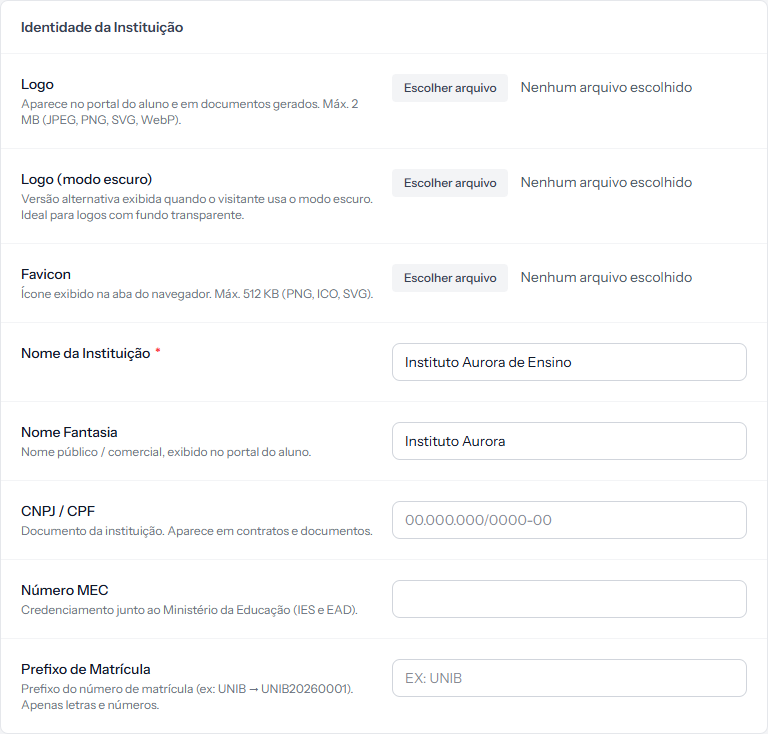 The first three fields are images; the four below are text. Only Institution Name carries the red asterisk. They are empty here, which is how the screen looks before you upload your brand. The screenshot is from the Portuguese panel; the layout is the same in English.
| Field | Where it appears |
|---|---|
| Logo | Student portal and generated documents |
| Logo (dark mode) | The portal, when the visitor uses dark mode |
| Favicon | The browser tab |
| Institution Name | Contracts and documents — the only required field |
| Trade Name | The student portal, as the public-facing name |
| CNPJ / Tax ID | Contracts and documents |
| MEC Number | Contracts, for accredited institutions |
| Enrollment Prefix | The number of every new enrolment |
The image limits
The screen itself states them, under each field:
- Logo and dark logo — max 2 MB, in JPEG, PNG, SVG or WebP.
- Favicon — max 512 KB, in PNG, ICO or SVG.
Each has a Remove link beside it, in red, which clears the current image.
The dark-mode logo is not decoration. A logo drawn in dark ink disappears on a dark background. If the school has only one version, check how it looks with dark mode on before deciding to skip the field.
The enrolment prefix changes the numbering
The screen's own hint shows the effect: UNIB → UNIB20260001.
It accepts letters and numbers. With no prefix, the numbering follows the system default.
The prefix only applies to new enrolments. Existing ones keep the number they were given. Changing the prefix mid-year creates two families of numbers living side by side — which breaks nothing, but confuses searching.
Trade Name vs Institution Name
It pays to keep them apart:
- Institution Name is the legal entity, the name on the contract.
- Trade Name is how students know the school.
Filling both with the same text wastes the chance to let the portal speak the student's language while the contract keeps its legal precision.
How you know it worked
The page returns to the General tab with the green banner, and the uploaded image is already in place of the old one.
If something goes wrong
The image is refused. It is over the size limit or outside the formats listed under the field.
The prefix is refused. It accepts letters and numbers only.
The new logo does not show in the portal. The browser is holding the old image. Open the portal in a private window to check.
Reviewed on · view as plain text