
What you will get
An understanding of the apply termination penalty box on the cancellation screen — and why, for some students, it comes disabled with a notice.
The penalty is a new charge, created at cancellation time, with its own line in the payment book. It is not a discount or a settlement: it is a debt the student takes on.
How the amount is calculated
The window shows the arithmetic openly, in three lines:
| Line | What it is |
|---|---|
| Calculation base | The sum of the instalments the student has not paid |
| Penalty rate | The percentage set in the school's settings |
| Penalty to charge | The result |
In the example on screen, a twelve-instalment enrolment of R$ 247.00 with two already paid gives a base of R$ 2,470.00; at the 10% the school set, the penalty comes to R$ 247.00.
The base is measured before the instalments change status. That is why the arithmetic holds even though the cancellation is happening at the same instant.
Instalments and how it is charged
Two fields set how the student pays the penalty:
- Instalments — from one up to the maximum the school configured. The screen shows each option's amount.
- First due date — when the first one falls.
- Payment method for the penalty — bank slip or PIX.
On confirmation, the penalty's instalments join the enrolment's payment book with the type Termination penalty, and the charge is issued right away.
When the option comes disabled
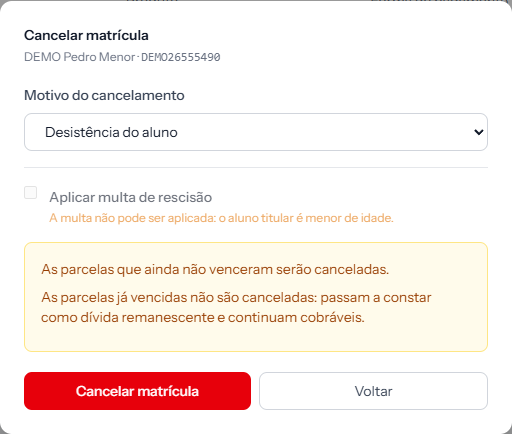 With the penalty blocked, the red button changes its wording: instead of "cancel and generate the penalty", it simply reads Cancelar matrícula.
There are four conditions, and all must hold:
| Condition | The notice when it fails |
|---|---|
| The penalty is enabled in settings | The termination penalty is disabled in settings. |
| The student has a date of birth on file | …the student has no date of birth on file. |
| The student is 18 or older | …the student is under legal age. |
| The student has a tax ID on file | …the student has no tax ID on file. |
The last three exist because the penalty is a collectable debt, and a debt needs an identified, legally capable debtor. A minor gets no penalty — a minor's contract is signed by a guardian, and the system does not store the guardian as the debtor.
What to do when it blocks
Date of birth or ID missing: complete the student's record and come back. The easy case.
Student under age: there is no route through the system. Charging the penalty, if the school will charge it, happens outside — and it is worth checking with your legal adviser how a minor's contract handles it.
Penalty disabled in settings: the switch is under Settings › Penalty and protest. Turning it on also changes what happens to already-overdue instalments in every cancellation, so read up first.
How you know it worked
After confirming, the enrolment's instalment panel gains a new row typed Termination penalty, with the amount and due date you chose — and the charge already issued in the charge column.
If something goes wrong
The enrolment was cancelled but the penalty charge failed. The system says so. The penalty's instalment is in the panel; issue the charge from its action menu.
The penalty amount is not what you expected. Check the percentage under Settings › Penalty and protest, and remember the base is only what remains unpaid.
You cancelled without ticking the penalty and wish you had. It cannot be applied afterwards. The penalty is generated at the moment of cancellation.
Reviewed on · view as plain text