
What you will get
The ability to read the system's most consulted screen without hesitating. You reach it through Ver on the enrolments list.
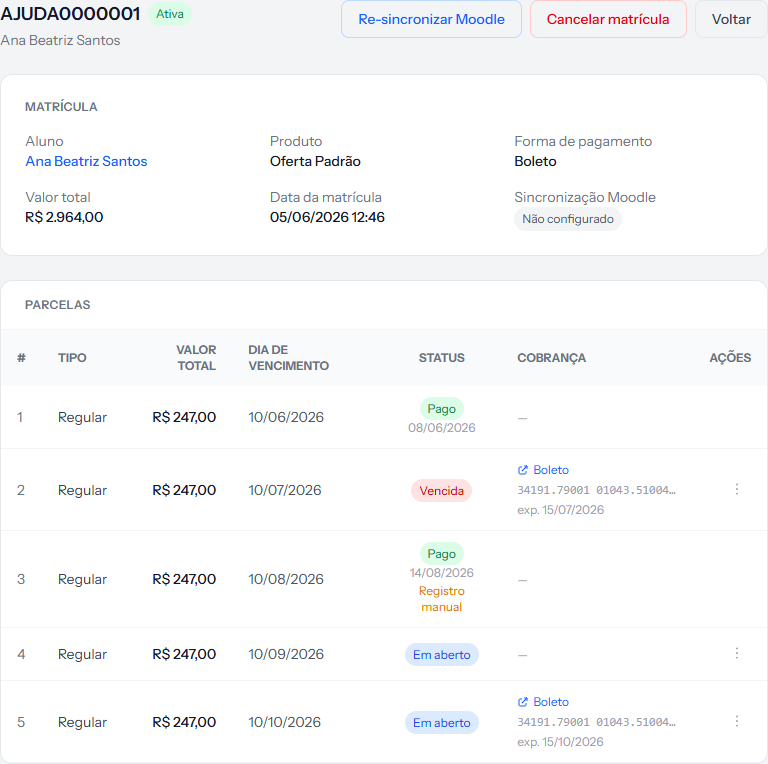 Three blocks: the header with the status and the buttons, the MATRÍCULA panel with the details, and the PARCELAS table with the payment book.
The header
On the left, the enrolment number, the status tag and the student's name. On the right, the buttons — and they change with the case:
| Button | When it appears |
|---|---|
| Re-sync Moodle | Whenever the class environment integration is active |
| Cancel enrollment | While the enrolment is neither cancelled nor completed, and only for whoever administers the account |
| Back | Always |
When the enrolment has a contract, buttons to download the document, regenerate it and — once signed — issue the acceptance receipt appear too.
The details panel
| Field | What it is |
|---|---|
| Student | The name, clickable, leading to their record |
| Product | The offering or trail sold |
| Payment method | Bank slip, PIX or card |
| Total value | The course amount, without the fee |
| Enrollment fee | Only appears when there is one |
| Cohort | Only appears when one was picked |
| Enrolment date | Day and time it was created |
| Moodle sync | The state of the send to the class environment |
| Notes | Only appears when someone wrote something |
The financial plan is not here. It is the detail this screen most lacks: once sold, there is no way to tell from the interface which condition the enrolment was closed under. That is why the year belongs in the plan's name.
The instalments table
Seven columns:
| Column | What it carries |
|---|---|
| # | The instalment number. The enrolment fee shows a dash |
| Type | Regular, Enrollment fee or Termination penalty |
| Total value | That instalment's amount |
| Due date | The date |
| Status | Open, Overdue, Paid, Cancelled, Outstanding debt |
| Charge | The slip, PIX code or card link, once issued. A dash means not yet. The Charge cancelled on badge, with the date, means someone cancelled the charge and it will not come back on its own |
| Actions | The three-dot menu, with what can be done to that instalment |
Three details live under the status: the date the instalment was paid; on card payments, how many instalments the student chose (for example, Paid in 3x via card); and, when it applies, the manual-record mark — meaning the settlement was made by hand, without the money passing through the system.
Change an instalment's payment method
In the three-dot menu, the Change to Bank slip, Change to PIX and Change to Credit card options switch the payment method of that instalment only. Both the owner and the team can do it.
- They only appear on an Open or Overdue instalment that has no charge issued yet. If it already has one, the charge must be cancelled first — and cancelling belongs to the owner.
- Only the methods the school's receiving account can charge appear, and never the method the instalment already has.
- Changing the method removes the Charge cancelled on badge: the instalment goes back to the normal billing flow.
It worked when the message "Installment payment method changed." appears.
How you know it worked
You can answer three questions at a glance: where the enrolment stands (the tag at the top), how much has been paid (the status column) and what has already been sent to the student (the charge column).
If something goes wrong
The Cancel enrollment button is missing. Either the enrolment is already cancelled or completed, or you are on the team — cancelling belongs to the account owner.
The charge column is all dashes. Slips and PIX are only issued close to the due date, within the lead-time window, so the instalments further out show a dash until then. The enrolment fee, whatever falls due within the window and the card instalments, on the other hand, get a charge as soon as the enrolment is created. If not even those have one, issuing failed: whoever administers the account gets an email about it, and the daily routine tries the slip and the PIX again.
Moodle sync says "Not configured". The enrolment did not reach the class environment. The article on re-syncing, next door, has the diagnosis.
You want to know which plan the enrolment used. The screen does not show it. That is a known limitation.
Reviewed on · view as plain text