
What you will get
An enrolment ended, knowing exactly what is left behind. Only the school owner can cancel — if you are on the team, the button does not appear.
The path is to open the enrolment and click Cancel enrollment at the top.
Cancellation cannot be undone. A cancelled enrolment stays in the history and cannot be reactivated. If the student returns, it is a new enrolment.
The cancellation window
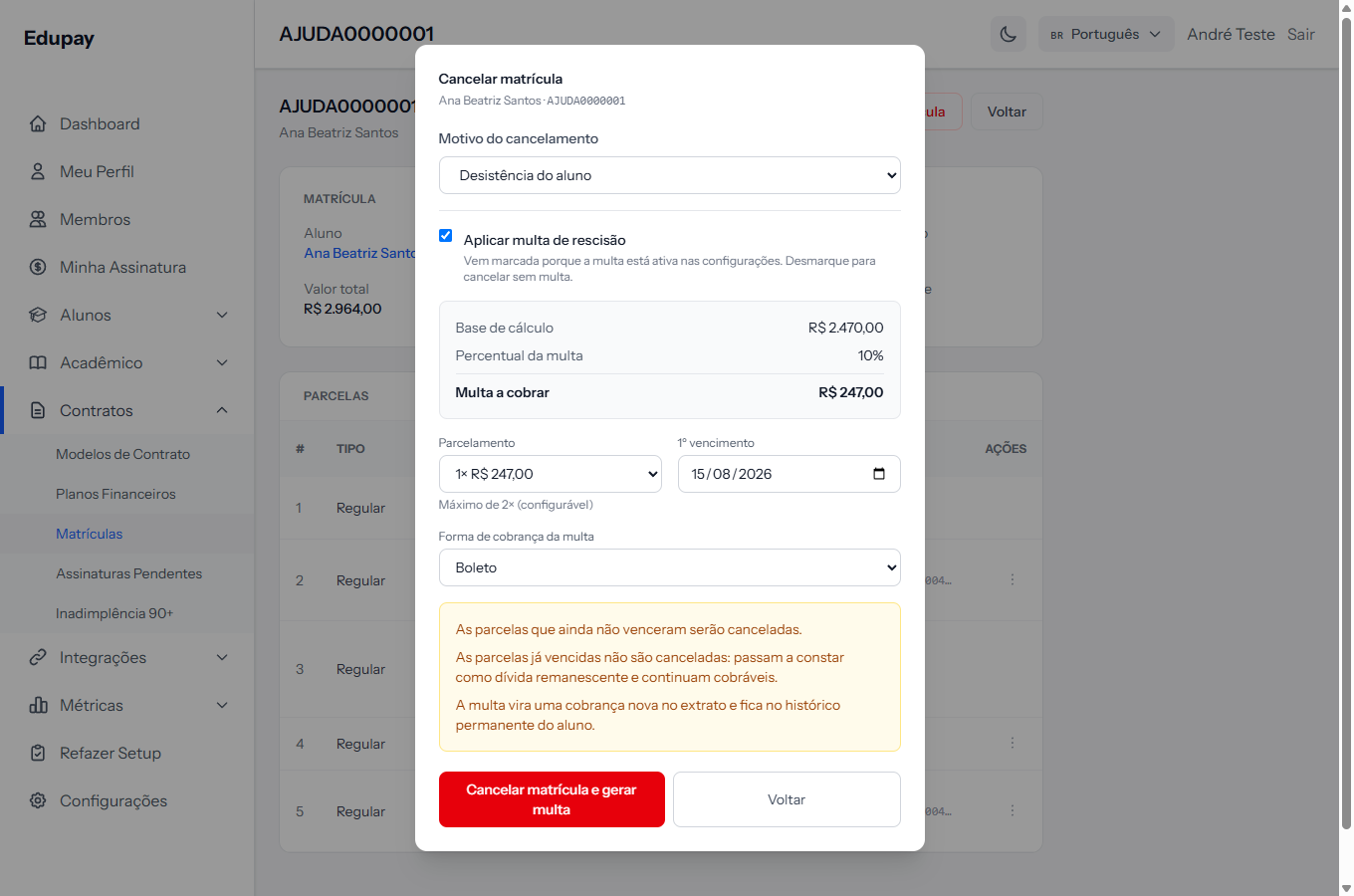 The yellow box at the foot is the most important part of the screen: it says, before you confirm, what will happen to the money.
1. Pick the reason. There are four: student withdrawal, transfer to another institution, default, and administrative cancellation. It is recorded in the history and helps make sense of cancellations later.
2. Decide about the termination penalty, if it is enabled. The article next door explains when it can be applied and how the amount is calculated.
3. Confirm.
What happens to the instalments
This is the part that surprises people, and it depends on the termination penalty being enabled in settings:
| Instalments not yet due | Instalments already overdue | |
|---|---|---|
| With the penalty enabled | Cancelled | Become outstanding debt and remain collectable |
| With the penalty disabled | Cancelled | Cancelled too |
In other words: enabling the penalty module changes what happens to what the student already owed, even when you cancel without applying any penalty at all.
The window itself says so, in Portuguese: "As parcelas já vencidas não são canceladas: passam a constar como dívida remanescente e continuam cobráveis."
What happens to charges already issued
The charges on the cancelled instalments are cancelled along with them, so the student does not pay for an enrolment that has already ended:
- PIX and card links are withdrawn immediately. The student can no longer pay them.
- A slip still within its validity cannot be cancelled before its due date — that is a Stripe rule. It stays payable until then, and the screen warns you right after you confirm.
- Outstanding debt, when the penalty is enabled, keeps the charge it already had, because it remains collectable.
If the student pays an instalment after the cancellation, the payment is recorded on it — the instalment shows Paid — and the enrolment stays Cancelled. It is then up to the school to decide whether to refund the money.
What else happens
- The student gets an email about the cancellation.
- The student leaves the class environment, if the integration is active.
- The contract stays stored. Documents are not erased.
- The student's record is untouched. They stay on the list, with their other enrolments.
Three questions before cancelling
Will the overdue instalment keep being charged? It depends on the penalty module — see the table above. If the intention is to write the debt off, check first.
Will the school charge a penalty? If so, tick the option at cancellation time. It cannot be applied afterwards.
Is the reason right? It is what will explain this cancellation six months from now.
How you know it worked
The green banner says Enrollment cancelled successfully., the tag at the top becomes Cancelled, and the instalment panel shows the rows with their new statuses — cancelled or outstanding debt.
When a slip within its validity is left, a yellow notice appears instead of the green banner: "Enrollment cancelled. Note: 1 boleto(s) still within their validity cannot be cancelled at Stripe before expiring and remain payable until then — if paid, the payment is recorded on the installment for you to review a refund." The enrolment was cancelled all the same.
If something goes wrong
The message says this enrolment cannot be cancelled. It is already cancelled or completed.
You cancelled by mistake. There is no reverting. Create a new enrolment; the old instalments stay in the history.
The penalty was created but the charge failed. The system says the enrolment was cancelled and the penalty created, but issuing did not go through. The penalty's instalments sit in the panel, ready to be issued by hand.
You only wanted to stop charging, not end the enrolment. There is no middle ground. Individual instalments can be handled one by one from each one's action menu: Cancel Charge takes the charge down, and the instalment is not reissued automatically until someone issues it again.
Reviewed on · view as plain text