
What you will get
The ability to read any enrolment's status tag and know, at once, what has already happened and what is still missing.
The enrolment is the system's central piece. It joins the student, the product, the cohort, the plan and the contract — and the instalments are born from it. Everything registered beforehand exists to arrive here.
The five statuses
| Status | What it means |
|---|---|
| Awaiting contract | The contract was generated and the student has not signed |
| Awaiting payment | Everything is ready; the first instalment has not been paid |
| Active | The student is studying and paying |
| Cancelled | The enrolment was ended early |
| Completed | The course finished |
Where an enrolment comes in
On save it is born in one of two statuses, and the contract template decides which:
- With a template that requires a signature → born Awaiting contract. Nothing moves until the student signs.
- With no template, or one that does not require it → born straight into Awaiting payment.
It is the only choice on the form that changes the enrolment's course, and it sits in step 3.
The normal path
Awaiting contract → Awaiting payment → Active → Completed
Each arrow has a trigger:
- Contract → payment: the student signs in the portal.
- Payment → active: the first instalment is paid.
- Active → completed: the course reaches its end.
The detours
Cancelled can happen from any of the first three. It is the only exit the system offers for ending early, and it has its own screen.
An expired contract is a separate case: when the template has a signing deadline and it passes, the contract expires. If the school turned on automatic cancellation in settings, the enrolment falls with it.
What each status unlocks and locks
| Status | Charging | Cancelling |
|---|---|---|
| Awaiting contract | Instalments already exist | Allowed |
| Awaiting payment | Instalments already exist | Allowed |
| Active | Instalments running | Allowed |
| Cancelled | Ended | No |
| Completed | Ended | No |
Instalments are born with the enrolment, not when it turns active. And the first charges go out right away, even before the contract is signed: the card link and, for slips and PIX, whatever falls due within the lead-time window — the enrolment fee included. An enrolment stuck at "Awaiting contract" already has its payment book built and may already have a charge sent to the student.
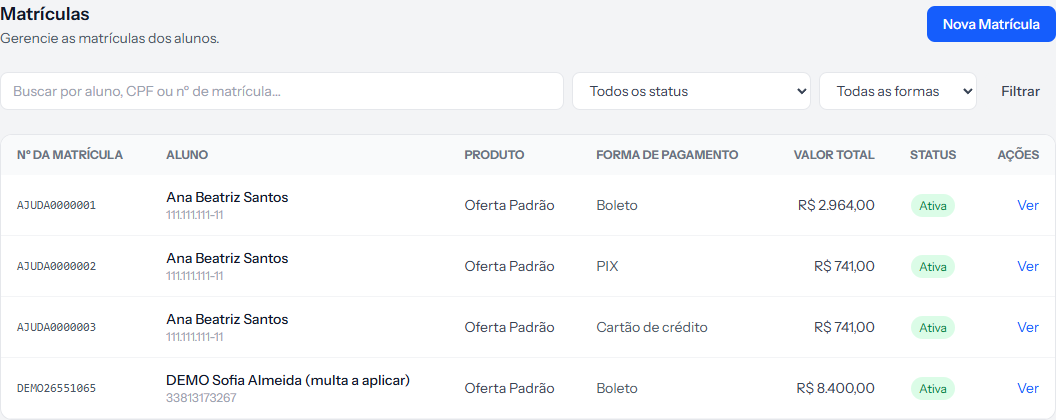 The tag in the last column is the status. The filter at the top splits the list by it.
How you know it worked
You open the enrolments list, look at the Status column and know, without clicking anything, who is waiting to sign, who is waiting to pay, and who is already studying.
If something goes wrong
The enrolment is stuck at "Awaiting contract". The student has not signed. Check Contracts › Pending Signatures.
The enrolment is active but the student paid nothing. The status changes on the first recognised payment. If it was paid outside the system, someone has to record it.
You want to undo a cancellation. You cannot. A cancelled enrolment stays in the history and a new one has to be created.
Reviewed on · view as plain text