
What you will get done
Sending a debt to protest once every friendly route has been exhausted — and understanding why some rows on the list will not let you.
Protest is the last step of collection. It costs money, it affects the student's name, and undoing it costs as well. That is why nothing here happens on its own: every send goes through a review screen and a confirmation recorded under your name.
Before you start
The registry service has to be connected. Without it the menu does not even appear. If you cannot find Delinquency 90+ under Contracts, start with the connection article.
The rules have to be set in Settings › Penalty and protest: how many days overdue and from what amount a debt joins the list.
Who ends up on the list
Contracts › Delinquency 90+ gathers the instalments that crossed the two limits you configured. A line at the bottom of the list reminds you which ones they are.
It includes overdue instalments from active enrolments and leftover debt from cancelled ones alike. Both are money still owed.
Card instalments are included too: they now have a due date and, if unpaid, become overdue like the others.
If the school's EduPay subscription was cancelled or has ended, no instalment joins the list and nothing is sent — EduPay does not protest on behalf of a school that has left.
At the top, four numbers summarise the picture: To send, At the notary, Returned and Not protestable.
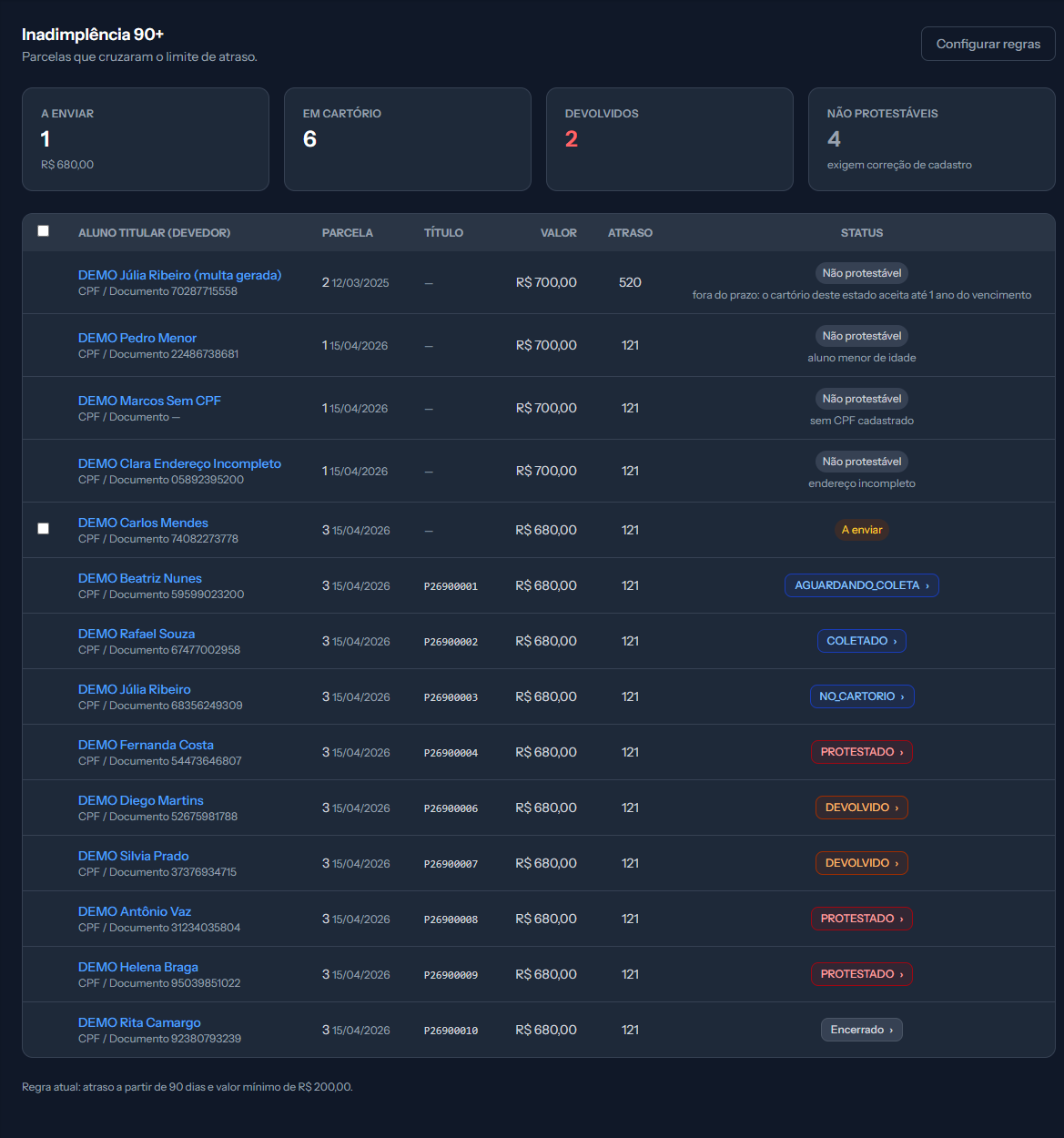
Notice that only the first two rows have a checkbox: the rest are blocked, and the reason is written under the badge.
Why a row comes up blocked
Not every old debt can go to a notary. When it cannot, the row stays on the list — but without its checkbox, marked Not protestable and with the reason written underneath. That is deliberate: it tells you what to fix.
| What it says | What fixes it |
|---|---|
| student under legal age | Nothing. Protest requires legal age |
| no tax ID on file | Fill in the student's tax ID |
| incomplete address | Complete postcode, street, district, state and city |
| past the deadline | Nothing. The debt grew too old for that state's notary |
| contract is not accepted in SP | Switch the title kind to service invoice |
The first three are fixed on the student record. The last two are not your mistake — they are notary rules, and each one is worth understanding.
Past the deadline. Notaries refuse debt that is too old, and the limit depends on the state where the student lives. In most of Brazil it is 12 months from the due date; in ten states the window is longer. Since the list starts at 90 days, that usually leaves around nine months to act.
Contract not accepted. São Paulo notaries do not accept a contract as the document behind the debt. For a student living there the kind has to be service invoice — and it is the student's municipality that decides, not the school's.
Step by step
1. Open Contracts › Delinquency 90+.
2. Tick the instalments that go to the notary. Only unblocked rows have a checkbox.
3. Click Send to protest. The Review before sending to protest window opens.
4. Check what it says. This is exactly what the notary will receive, and that snapshot is kept even if the record changes later. Look closely at the tax ID and the address: the document identifies the person, and the municipality decides which notary gets the title.
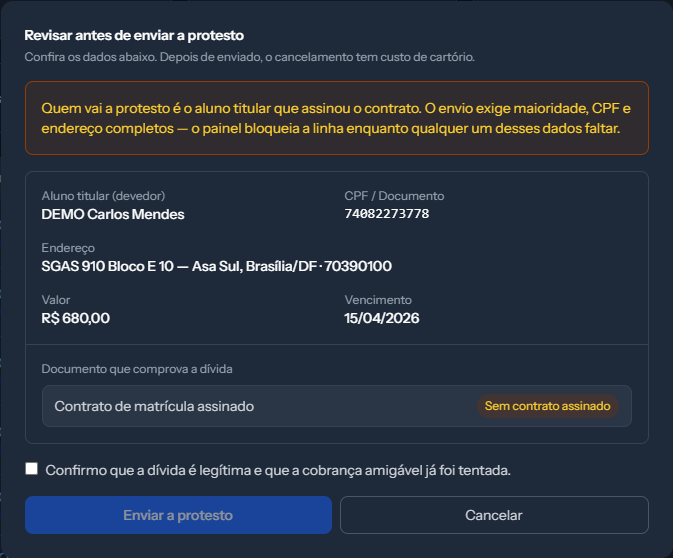
Look at the document that backs the debt line. When the amber badge reads "no signed contract", the title goes without an attachment — and the contract is exactly what proves the debt if the student disputes it.
5. Tick the confirmation. "I confirm the debt is legitimate and that friendly collection has already been attempted." Without it the send will not go through.
6. Click Send to protest.
Each instalment is one title, and each title carries a fee. Selecting twelve instalments from the same student means twelve filings and twelve fees. If the intent is to apply pressure, one instalment usually does it.
The weight of that confirmation
The tick box is not a formality. When you tick it, the system records who confirmed, when and from where — and that record is what defends the school if the protest is challenged later.
Only tick it if both things are true: the debt exists, and the school already tried the normal collection routes.
How to know it worked
The row gets a number in the Title column — something like
P26000001— and the status turns into a blue button reading AGUARDANDO_COLETA. That number is how the service and the notary know this debt.
The send runs in the background, so it may take a few seconds. Refresh the page if the number has not shown up yet.
From there the status changes on its own as the notary works. The tracking article walks through each stage.
If something goes wrong
The instalment disappeared from the list after I fixed the record. It is still there — it most likely moved, since the list is sorted by due date. Look for the student's name.
I ticked the confirmation and the button still will not send. Check whether a selected row became blocked in the meantime. The window tells you which one.
The status stalled and a warning appeared on the title page. The send failed and the reason is written on the timeline at the bottom. It is almost always debtor data the notary would not accept. Fix it and resend.
The screen is up but the send button will not click. The registry authorisation expired. The list still works for checking records; sending comes back once somebody reconnects.
Reviewed on · view as plain text