
What you will get
An understanding of where the installments on an enrollment come from, and what each word in the STATUS column means. You never create an installment by hand: they are all generated at once, the moment the enrollment is created.
Where installments come from
When you create an enrollment, EduPay looks at the chosen price table and generates every installment right there. Two things are born together:
- The enrollment fee, if the price table has one. It becomes a separate installment, due on the day of the enrollment itself, and shows up in the TYPE column as something other than a monthly payment.
- The monthly payments, one for each contracted month, each with its own due date. The amount is split in cents; when the division is not exact, the difference goes on the last installment — R$ 1,000.00 in 3 gives R$ 333.33, R$ 333.33 and R$ 333.34.
Every installment is born with the enrollment's payment method, the fee included.
After that the list does not change on its own. It only changes when someone pays, when you issue a duplicate slip, when you change the payment method of an installment, or when the enrollment is cancelled.
A card enrollment is different: it generates one single installment, for the whole amount, due 3 days after the enrollment date (or the billing start date, if that is later). The instalment plan happens on the student's card statement, not here — for the school, it is a single charge. If it is not paid by the due date, it becomes Overdue like any other.
What each status means
| Status | What happened |
|---|---|
| Open | The installment exists and is not due yet. This is how every installment is born |
| Overdue | The due date has passed and nobody paid |
| Paid | The money came in. The payment date shows underneath |
| Cancelled | The installment was voided, usually because the enrollment was cancelled |
| Waived | The school decided not to charge that one |
| Outstanding debt | Left over from a cancelled enrollment: the student still owes, but no longer studies |
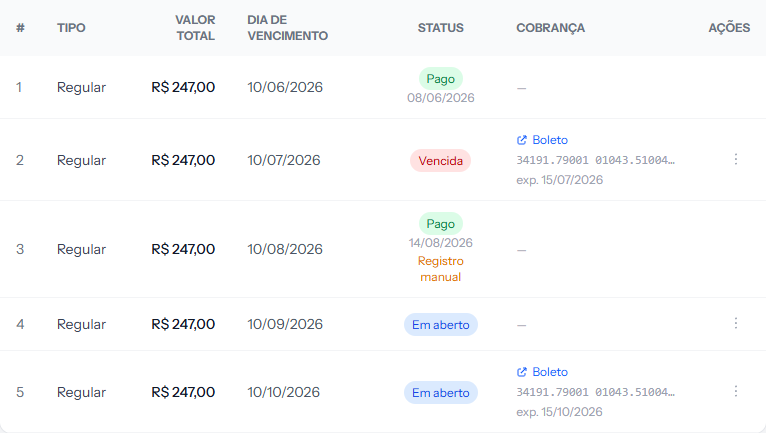 The five statuses side by side. The colour of the tag in the STATUS column already tells you where each installment stands.
Issuing the slip does not change the status. An installment with a slip issued stays Open until the money arrives. What shows that the charge went out is the CHARGE column, not the STATUS column.
How to tell it worked
Open a freshly created enrollment and the installments panel is already filled: one row per contracted month, all Open, with due dates a month apart. If there is an enrollment fee, it is the first row and it is due today.
If something goes wrong
The enrollment has no installments at all. This happens when the price table was not complete at the moment of creation. Check the price table and create the enrollment again.
The number of installments does not match what was agreed. The count comes from the price table, not from the enrollment. If it is wrong for everyone, fix the table; if it is a one-off, cancel and redo the enrollment with the right table.
There is one extra installment at the top. That is probably the enrollment fee. Check the TYPE column: it is born separate from the monthly payments, due on the day the enrollment was created.
Reviewed on · view as plain text