
What you will get
An understanding of the routine that works overnight for you. Every morning, before anyone at the school opens the system, EduPay issues the charges for the installments coming due and sends them to the students.
In practice: in most months nobody at the school has to issue anything. Issuing by hand exists for exceptions — the student who asks early. Not even the enrollment created at the last minute needs it: when the enrollment is saved, whatever already falls due within the lead time goes out right away, the enrollment fee included.
How the routine decides what to issue
It looks for boleto and PIX installments that meet three conditions at once:
- they are still Open — or Overdue by no more than 7 days, to retry an issue that failed;
- they do not have a charge in force;
- they fall due within the lead time the school configured.
Anyone who already has a slip in force does not get another. Anyone who has paid is skipped. If the slip or the PIX expired unpaid, the routine replaces it with a new one and lets the student know.
An installment whose charge someone at the school cancelled is left out: it shows the Charge cancelled on dd/mm/yyyy badge and is only billed again when someone issues it from the installment's menu.
Changing the lead time
Whoever administers the EduPay account changes this under Settings, on the billing tab, in the field Days before due date to issue. The default is 3 days.
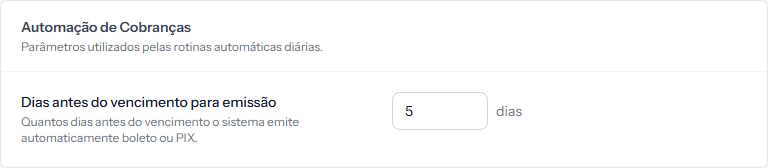 The block is called Billing Automation. The number shown here is your school's — the factory default is 3 days.
It is worth thinking about your students before changing it:
- Fewer days (2 or 3) keeps the slip fresh in the student's hands, with less chance of them forgetting it or losing the paper.
- More days (7 or 10) gives room to whoever has to ask someone else for the money before paying — which is common when the person studying is not the person paying.
How to tell it worked
The next morning, the installments falling due inside the window show a filled CHARGE column, and the students have the slip in their inbox. You do not have to do anything for that to happen.
If something goes wrong
An installment came due with no slip at all. Check whether it really was Open and without a charge. The most common cause is the school's payment account having disconnected — without it no charge goes out, by hand or on its own.
When the routine fails, whoever administers the account gets an email saying what it could not issue. If that email arrived, it is the best starting point: it names the installment and the problem. Once the cause is fixed, the routine tries again on its own the following night — or issue it by hand if you are in a hurry.
The installment shows the Charge cancelled on… badge. The charge was cancelled by someone at the school, and the routine does not issue it again. If it should be billed, issue it from the three-dot menu.
You want the slip before the window. Issue it by hand from the installment's three-dot menu. The routine will not issue it again later, because the installment will already have a charge.
Reviewed on · view as plain text