
What you will get
A charge that already went out, voided — because it was on the wrong installment, for the wrong amount, or for the wrong student. PIX and card links are cancelled immediately. A slip can only be cancelled after its due date: that is a Stripe rule, and until then the slip stays valid.
Cancelling the charge does not cancel the installment. The installment still owes money; what disappears is the slip, the code or the link that was valid.
Once cancelled, the charge does not come back on its own. The daily routine stops issuing that installment, and it is only charged again when someone issues it again from the menu.
Step by step
1. Open the student's enrollment, under Contracts › Enrollments, and find the installment's row.
2. Click the three dots at the end of the row. The Cancel Charge option only appears on installments that already have a charge issued.
3. Confirm. The system asks before doing it, because there is no going back: once cancelled, the old slip does not become valid again.
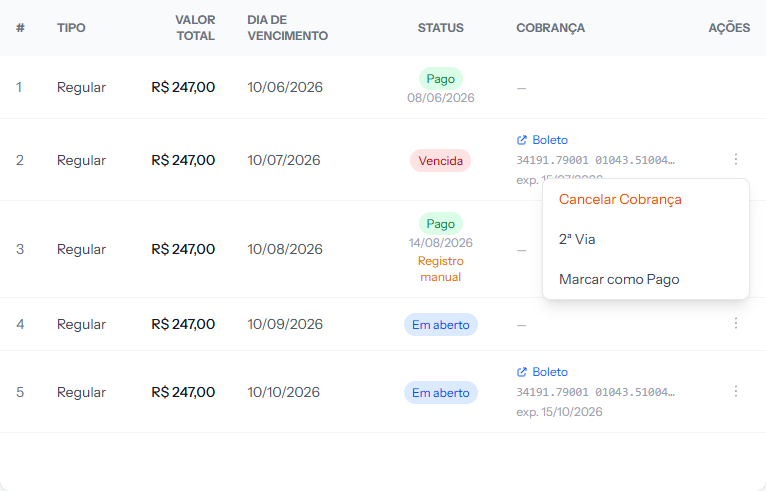 Notice there is no Issue Boleto on this one: because it already has a charge, the menu swaps that option for Cancel Charge.
How to tell it worked
A message confirms the cancellation, and the CHARGE column on that installment shows the Charge cancelled on badge with the date, and right below it: "It will not be reissued automatically. Issue it again to resume billing." In the portal, the student sees the installment with the notice "Billing suspended by the institution. If in doubt, contact the office."
To start charging again
Use the same menu. Issue Boleto, Generate PIX or Card Link, depending on the installment's payment method, issues a new charge. If the idea is to charge another way, the Change to … options switch the installment's payment method. Either path removes the badge, and the installment goes back to the normal flow.
If something goes wrong
A message says the current boleto is valid until a date. That is the slip rule: "The current boleto is valid until dd/mm/yyyy, and Stripe does not allow cancelling a boleto before it expires. Until then it remains payable (if paid, the payment is recorded). Cancel the charge or create a second copy after that date." Nothing was cancelled. Come back after the date shown.
The Cancel Charge option does not appear. Two possible reasons. Either the installment has no charge issued — check the CHARGE column, which will show a dash or the Charge cancelled on badge. Or you are a team member: this action belongs to whoever administers the EduPay account.
The student had already paid when you cancelled. The payment does not disappear. Check the STATUS column: if it reads Paid, the money came in and the installment is settled, whatever happened to the charge.
You only wanted to change the date or the amount. Cancelling is the longer way round. 2nd Copy, in the same menu, issues a new slip with a new due date without cancelling anything first — but it follows the same rule as cancelling: it only goes out after the current slip stops being valid.
The student already had the slip in hand. They will try to pay it and the bank will refuse. Warn them before cancelling, especially if they were already on their way to pay it.
Reviewed on · view as plain text