
What you will get
An installment marked as paid by hand, so it stops counting as owed. It is the path for money that arrived outside EduPay: cash at the counter, a direct transfer into the school's account, an arrangement settled on the side.
Step by step
1. Open the student's enrollment, under Contracts › Enrollments, and find the installment's row.
2. Click the three dots at the end of the row and choose Mark as Paid.
3. Check the two fields in the window titled Record Payment.
- Amount paid — pre-filled with the installment's amount. Change it if the student paid something else.
- Payment date — pre-filled with today. Change it to the day the money actually came in; that is the date the reports will use.
4. Click Save.
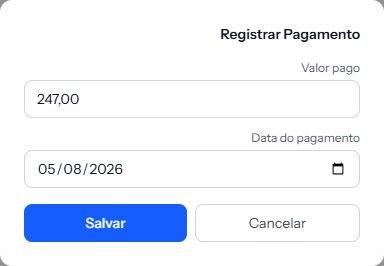 Both fields come pre-filled. Change the date if the money came in on another day — that is the one the reports will use.
What happens alongside
- The installment starts showing Paid, with the date you entered.
- A Manual record mark appears underneath, which sets this settlement apart from the automatic ones. It exists so that whoever reconciles the books later knows this money did not go through the system.
- If this was the last open installment, the whole enrollment turns Completed.
- If the student had lost access to the class environment because of arrears, and nothing else is left open, the access comes back on its own.
- If the enrollment came from the online sale and the student did not have access to the class environment yet, this settlement grants it, just as a payment through the system would.
How to tell it worked
A message confirms the installment was marked as paid, and the row changes to Paid, with the date and the Manual record mark just below.
If something goes wrong
The Mark as Paid option does not appear in the menu. This action belongs to whoever administers the EduPay account. If you are a team member the item does not exist for you — ask whoever administers it.
You recorded the wrong amount. There is no way to undo it from the screen. Talk to support before touching anything else.
The student paid the slip and you also settled it by hand. The system does not charge twice: the manual settlement still stands. But the money really did come in twice — check the receiving account's statement and agree the refund with the student.
You want to mark an installment that will not be charged as paid. This is not the path. A manual settlement says "money came in"; forgiving an installment is a different thing, and shows in the list as Waived.
Reviewed on · view as plain text