
What you will get
The document that serves as proof of acceptance. The button is Issue Acceptance Receipt, in the contract block inside the enrolment.
It only appears once the contract has been signed. Before that, the system refuses with Receipt is available only for signed contracts.
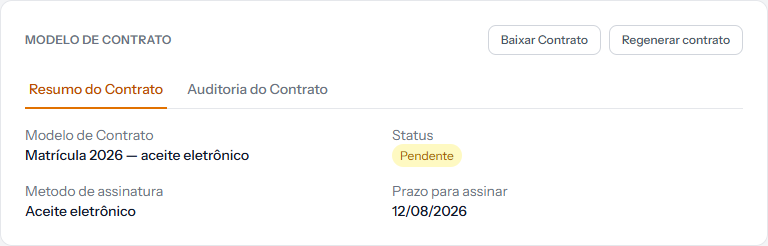 Here the receipt button is absent: the contract's status is Pendente — pending. It only appears once that tag turns to signed.
Contract and receipt are different documents
| The contract | The receipt | |
|---|---|---|
| What it is | The agreed text | The record that the student accepted |
| When it exists | From enrolment onwards | Only after signature |
| What it is for | Stating the rules | Proving acceptance |
In practice: keep both. The contract says what was agreed; the receipt says the person agreed, when, and from where.
What is inside
The receipt gathers what an argument about validity usually calls for:
- Who accepted and when — date and time.
- From where — the origin of the access, recorded at the moment of acceptance.
- The contract's history — each event, from sending to acceptance.
- A fingerprint of the text, which lets you prove later that the stored document is the one that was accepted.
That last item is what gives the set its weight: any change to the text changes the fingerprint, and the difference becomes obvious.
When to issue it
- Whenever the family questions what was agreed.
- At month end, alongside the enrolment's file, if the school keeps documentation per student.
- Before any legal collection, together with the contract.
Issuing it more than once costs nothing: it is generated on the spot, from what is stored.
How you know it worked
The browser downloads a PDF with the acceptance details and the list of contract events. The date and time match the signed-at value shown on the enrolment screen.
If something goes wrong
The message says the receipt is only for signed contracts. The student has not accepted yet. Check Contracts › Pending Signatures.
The student signed on paper and you want the receipt. A physical signature takes a different route: the document the student returned is the proof, and it is stored on the enrolment itself.
The button does not appear at all. The enrolment was created without a contract template.
Reviewed on · view as plain text