
What you will get
Knowing exactly what happens when you fill in Enrollment fee on a financial plan.
In one sentence: it becomes a separate charge, falling due on the enrolment date, and it sits on top of the course price.
What the system does with it
When the enrolment is created, the system generates one extra charge, ahead of the monthly ones.
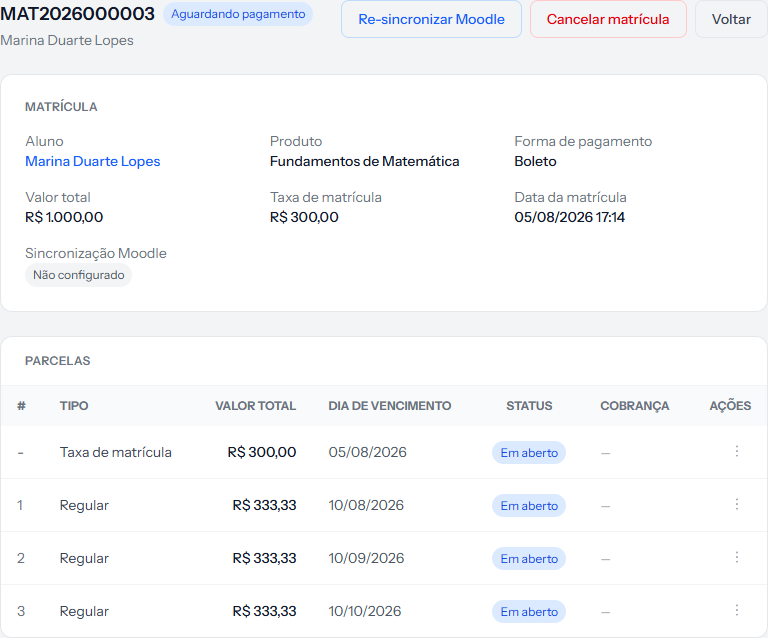 Notice two things: in the top panel, Valor total and Taxa de matrícula are separate lines. And in the table, the fee row has no number — the monthly instalments start at 1.
Three things set it apart from the monthly instalments:
- It falls due on the enrolment date, not on the plan's due day.
- It has no number. In the table it shows a dash in the # column.
- Its type is the enrollment fee, not Regular.
It is charged straight away
The fee is born with the enrolment's payment method and, with the receiving account connected, it is charged as soon as the enrolment is created:
- Card: payment is available straight away, and the fee shows up in the same email the student gets to pay for the course.
- Boleto or PIX: since it falls due on the day, the charge goes out straight away.
It is on top, not inside
This is the point that starts arguments with families, so it is worth being exact.
An enrolment of R$ 1,000.00 in 3 parts, with a fee of R$ 300.00:
| Amount | |
|---|---|
| Enrollment fee | R$ 300.00 |
| Instalment 1 | R$ 333.33 |
| Instalment 2 | R$ 333.33 |
| Instalment 3 | R$ 333.34 |
| Total the student pays | R$ 1,300.00 |
Note the last instalment: the split is done in cents, and the leftover cent goes on it, so the total adds up exactly.
The course price stays at R$ 1,000.00 and that is what appears under Valor total. The fee is neither deducted from the monthly instalments nor spread across them.
If your school advertises "enrolment + 11 monthly payments" with the fee already inside the announced total, type the course value on the enrolment without the fee. Otherwise the family pays it twice.
Changing the fee for one student
The plan's amount is a suggestion. The enrolment screen has its own Enrollment fee field, pre-filled from the plan and editable before saving — for a scholarship, a second child, an agreed waiver.
Watch one detail: leaving the field blank does not waive anything. The hint underneath says what happens — "If left blank, the system uses the enrollment fee defined in the financial plan." To charge no fee on this enrolment, type 0.
How you know it worked
On the enrolment screen, the top panel shows Taxa de matrícula with its amount beside Valor total, and the instalment table starts with the fee row, falling due today.
If something goes wrong
The fee did not appear. Either the plan had no fee, or the field was cleared on the enrolment. It is created at enrolment time and never turns up later on its own.
The family says the total came out higher than advertised. Check whether the course value on the enrolment already included the fee.
You need to split the fee. You cannot: it is always a single charge. To spread the entry payment, add it into the course value and use a plan with more instalments.
Reviewed on · view as plain text