
What you will get
The confidence to fix the contract's wording. The short answer is the best part:
Editing the template changes no contract already generated. Each enrolment keeps its own frozen copy, made at the moment it was created.
Why that is good news
Because a contract is a document. If the student's text changed whenever you fixed a comma in the template, nobody could ever touch the template again — and what the student signed would stop being what is stored.
The way it works today:
| You do | What happens |
|---|---|
| Fix a clause in the template | Applies to new enrolments |
| Change the signature method | Applies to new enrolments |
| Change the signing deadline | Applies to new enrolments |
| Deactivate the template | It leaves the picker; existing contracts carry on |
The only way to rebuild a document
The enrolment screen has a regenerate contract button. It discards the document and builds another with the template's current text and the enrolment's current details.
It only works while the contract has not been signed. After signature the system refuses — and that is how it should be: a signed document is not rewritten.
It is the route when you spot a wording error and there is still time:
- Fix the template under Contracts › Contract Templates.
- Open the enrolment that has not been signed.
- Click regenerate contract.
For anyone who already signed, the old contract stands. If the error matters, that becomes an amendment — a lawyer's job, not the system's.
Changing the wording at the start of the year
The same logic as financial plans applies: when the contract genuinely changes, create a new template rather than rewriting the old one.
Matrícula 2026 — aceite eletrônico and Matrícula 2027 — aceite eletrônico live side by side without trouble, and the year in the name keeps the history readable.
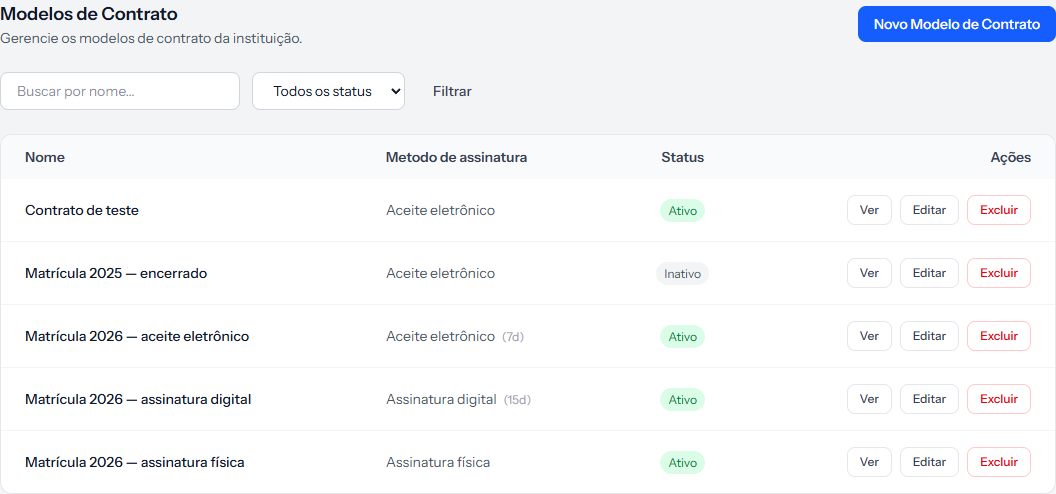 The 2025 template stays deactivated, out of the picker, and remains there to be consulted.
How you know it worked
Open an old enrolment's contract after editing the template: the text is exactly as it was. And a new enrolment, made after the edit, already carries the corrected text.
If something goes wrong
You fixed the template and the student's contract is still wrong. That is the correct behaviour. Use the regenerate-contract button on the enrolment, if it has not been signed.
The regenerate button does not work. The contract has already been signed. A signed document is not rebuilt by the system.
You want the fix to reach every student at once. There is no such route, and there should not be: each contract is its own document.
Reviewed on · view as plain text