
What you will get
The idea, before you touch the form. It is simple and settles the block's biggest question:
You write the contract once, with blanks. At every enrolment, the system fills the blanks with that student's details and stores a frozen copy.
The path is Contracts › Contract Templates. Only the school owner works here.
The blanks are called variables
In the text, you write %student_name% where the student's name belongs. At
enrolment time, that becomes Marina Duarte Lopes.
There are 37 variables in six groups, and the form shows them all with a click to insert into the text.
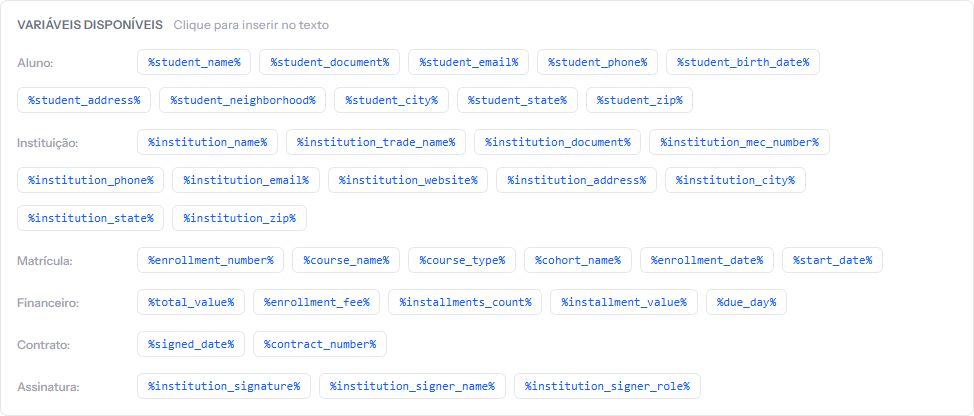 Clicking any of them inserts the code where the cursor is. There is nothing to memorise and nothing to type by hand.
What happens at every enrolment
When you save an enrolment that uses a template, the system:
- Reads the template's text.
- Swaps each variable for that student's, that course's, that plan's value.
- Stores the result as that enrolment's own copy.
Step three is what gives legal safety: the student's contract is not a link to the template, it is frozen text. Touching the template later does not touch it.
The three signature methods
Each template picks one:
| Method | How the student signs |
|---|---|
| Electronic acceptance | Clicks a button in the portal; the system records date, time and where the access came from |
| Digital signature | Draws or types their name in the portal |
| Physical signature | Prints it, signs on paper and sends it back through the portal |
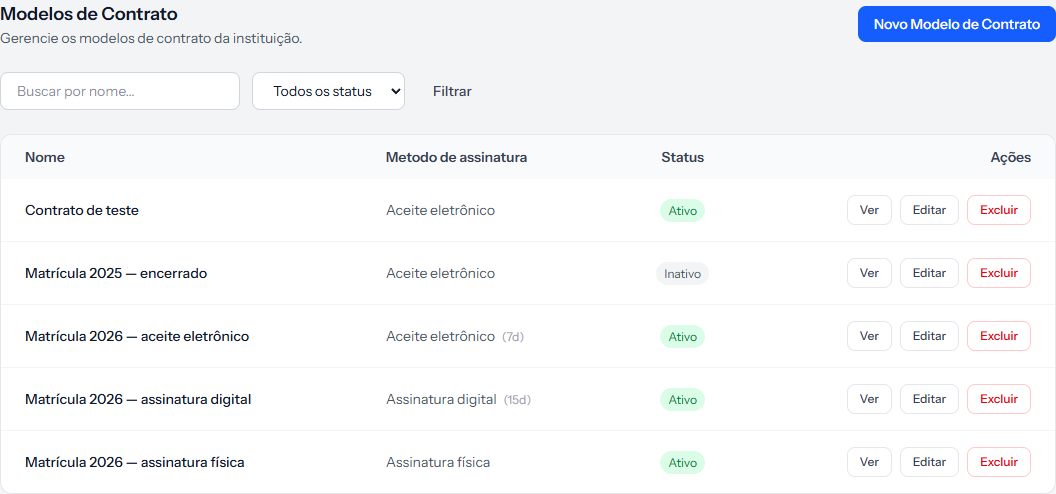 The middle column shows each template's method, and the number in brackets is the deadline in days to sign.
Requiring a signature changes the enrolment's course
The Require student signature box has a direct effect, spelled out by the hint beneath it: "When enabled, enrollment is only confirmed after the student signs."
In practice, the enrolment is born waiting for the contract and only then moves on to payment. Unticked, the enrolment is born cleared.
How you know it worked
You can explain the difference between template and contract: the template is the text with blanks, kept under Contracts; the contract is the filled-in, frozen copy, kept inside each student's enrolment.
If something goes wrong
The template does not show up when enrolling. Only templates with the status Active are offered.
You do not know how many templates to create. One is usually enough. Create another only when the text genuinely changes — by course type, by year, or by signature method.
You want to use the contract your school already has in Word. You can: paste the text into the editor and swap the variable parts for the codes. It is the fastest route.
Reviewed on · view as plain text