
What you will get
PIX accepted on your plan. Ticking PIX under the accepted payment methods reveals the same four fields as the bank slip: number of instalments, due day, late interest and late fee.
The configuration is identical to the bank slip's. What changes is what reaches the student.
What actually differs
| Bank slip | PIX | |
|---|---|---|
| How the plan is configured | Instalments + due day | The same |
| How the instalments are born | One a month, same day | The same |
| What the student receives | A slip with a barcode | A code to copy and paste |
| When payment is recognised | Within a business day | Within minutes |
PIX's practical advantage is the settlement: the system gets the notice almost immediately and the instalment turns to paid on its own, with nobody checking statements.
Does splitting PIX make sense?
It does, and more often than you would think. It is not a bank instalment plan: it is several charges, one a month, each with its own code. The student pays them one at a time.
For an outright sale, use 1 as the number of instalments.
Ticking both methods
Tick Bank slip and PIX on the same plan and the buyer chooses. Each method keeps its own numbers — you can have 12× by slip and 1× by PIX on the same plan, if the school wants to nudge people towards paying outright.
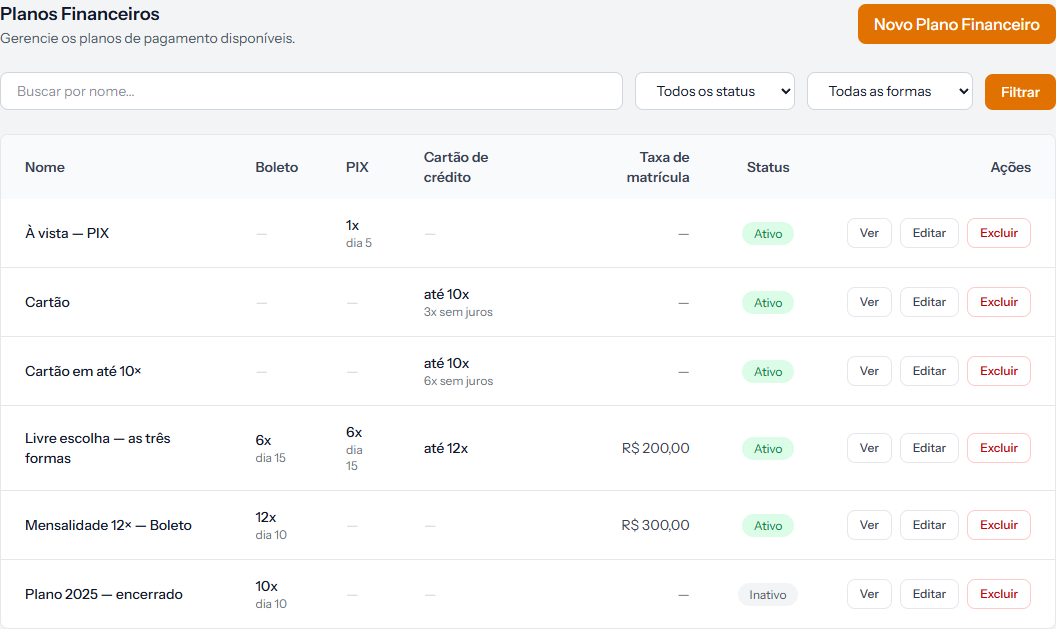 On the "Livre escolha" row, the Boleto and PIX columns each show 6x dia 15, and the card column shows up to 12x. One plan, three methods.
Before you start
PIX only reaches the student if the school's payment account accepts PIX. If yours is not connected yet, the plan can still be configured the same way — it is the charge that will not go out.
With the account connected, enrolment and catalogue sales only offer the methods the plan accepts and the account can charge. If PIX is not enabled on the account, or the school's currency is not the real, PIX drops out of the list even when ticked on the plan.
How you know it worked
On the plans list, the PIX column stops showing a dash and starts showing the number of instalments and the due day. And when creating an enrolment, PIX appears among the payment methods.
If something goes wrong
PIX does not show up when enrolling. Check that the chosen plan really accepts PIX — the list of methods comes from the plan, not from settings. If the plan accepts it, the reason is the receiving account: without PIX enabled on it, PIX is not offered.
You ticked PIX and the fields came out blank. That is expected: each method has its own numbers, and none is copied from the bank slip.
The student says the code expired. The code is valid until the end of the instalment's due date. If it expired unpaid, the daily routine generates a new code on its own, for up to 7 days after the due date. If it is urgent, a second copy generates a new code on the spot.
Reviewed on · view as plain text