
What you will get
Knowing exactly what is already done after saving — and stopping the search for buttons that do what the system has done.
The four things
1. The enrolment number. Generated on the spot, with the prefix the school set in Settings. It is how the enrolment is found later.
2. The contract, if you picked a template. The template's text is filled in with that student's details and stored as the enrolment's own copy. Editing the template afterwards does not change that document.
3. The whole payment book. Every instalment at once, with amounts and due dates calculated. If the plan has an enrolment fee, it becomes a separate charge falling due today. With the receiving account connected, the bank slip and PIX charges that already fall due within the configured lead time — the enrolment fee, for instance — are issued right away.
4. The notices. The student gets an email as the case requires — the active enrolment one, the contract-to-sign one, the charge-issued one.
What does not happen automatically
The negative list is worth having, because it saves waiting:
- The other bank slip and PIX charges are not issued on the spot. The instalments exist; the slip for the ones falling due later goes out through the daily routine, at the configured lead time, or by hand.
- The student is not added to the cohort's list. The chosen cohort is recorded on the enrolment, but the list on the cohort's screen is a separate thing.
- The enrolment does not turn active by itself. It becomes active when the first payment is recognised.
The exception is the credit card: there the payment link is generated right away, along with the enrolment, and the student gets a single email, with a button that leads to the portal, where they pay.
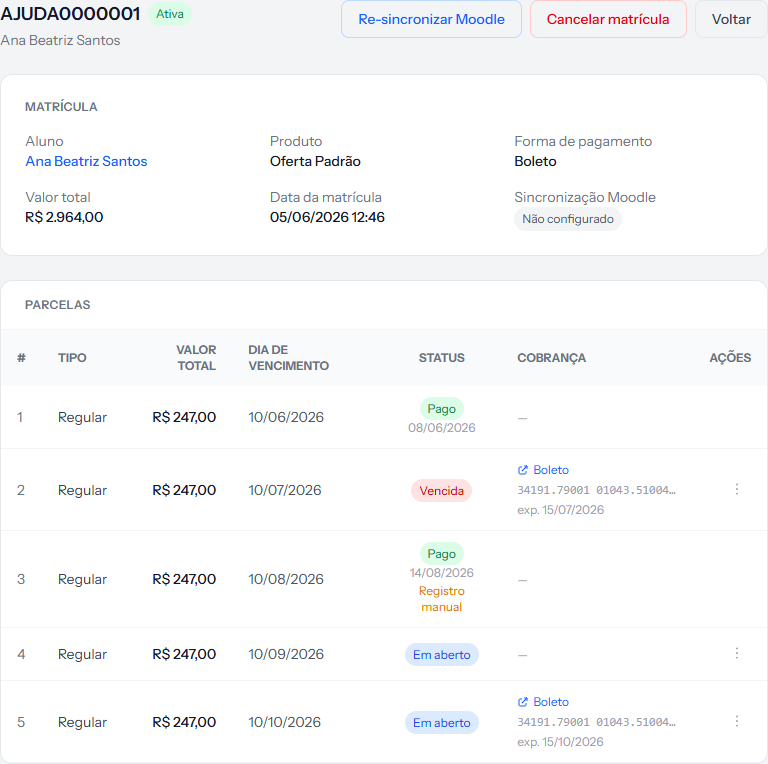 All of this appeared on its own: the number, the amount, the instalment panel with dates. A dash in the COBRANÇA — charge — column of an instalment still far from its due date means the slip has not been issued yet, and that is normal.
Where the due dates come from
The day of the month comes from the plan. Which month it starts in depends, in this order:
- The billing start date, if you filled it in.
- The cohort's start date, if it falls after today.
- Today.
That is why enrolling in August for a cohort starting in February already puts the first instalment in February.
On card the rule is different: the single instalment falls due 3 days after the billing start date or the enrolment date — whichever is later.
How you know it worked
The enrolment screen opens with the number at the top, the MATRÍCULA panel filled in and the PARCELAS table with the right number of rows. If you picked a contract template, the status at the top is Awaiting contract.
If something goes wrong
The instalment panel came out with a single row. The payment method is card. On card the system creates one charge for the full amount; the student's bill does the splitting.
No bank slip was issued. For instalments falling due after the lead time set in Settings, that is expected: they go out through the daily routine. If not even the enrolment fee, due today, went out, check whether the receiving account is connected. When issuing fails, whoever administers the account gets an email with the reason, and the daily routine tries again.
The student received no email at all. Check whether they have an email on file and portal access.
The enrolment fee did not appear. Either the plan has no fee, or the field was zeroed in step 5.
Reviewed on · view as plain text