
What you will get
A clear basis for choosing which of the three signature methods to put on a contract template. The choice is made once, on the template — and it applies to every enrolment that uses it.
The three, side by side
| The student does | The office does | How long it takes | |
|---|---|---|---|
| Electronic acceptance | Ticks a box and clicks Confirm acceptance | Nothing | Seconds |
| Digital signature | Draws a signature on screen or types their name | Nothing | Seconds |
| Physical signature | Prints, signs on paper, photographs and uploads | Checks and approves, one by one | Depends on the student and the queue |
The first two settle themselves. The third creates recurring work: every contract submitted goes into the Pending Signatures queue and waits for someone to approve it.
What gets stored in each
All three record the same core facts: date, time, IP address and the device of whoever signed, plus a history of every time the contract was opened. What goes alongside differs:
- Electronic acceptance — the confirmation of the ticked box.
- Digital signature — the signature image, which appears in the PDF.
- Physical signature — the files the student sent and a record of who approved them.
In all three, the contract text is frozen at the moment the signature happens. Changing the template afterwards does not alter what was signed.
How to choose
Electronic acceptance is the default for short courses, online enrolment and anything with volume. Fewer steps, fewer people dropping out halfway.
Digital signature fits when the school wants a drawn signature on the document — out of habit, because whoever reads the contract later expects one, or because the PDF will travel outside the system.
Physical signature is for when paper is mandatory: a minor with a guardian co-signing, a requirement from the governing body, a contract that goes to another authority. It is the most laborious of the three — choose it out of necessity, not habit.
What is the same in all three
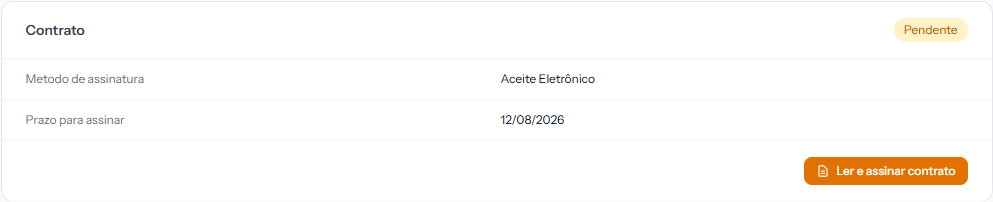 The student reaches the contract through Read and sign contract, inside the enrolment. The panel shows which of the three methods was chosen.
- The student needs portal access. Without it, there is no way to sign.
- The deadline is the same field on the template. Once the deadline passes and the nightly routine runs, the contract becomes Expired and can no longer be signed.
- While the contract is unsigned, the enrolment sits at Awaiting contract: the instalments already exist, but the enrolment has not moved.
Where the choice is made
Under Academic › Contract Templates, in the template's Signature method field. The contract templates article shows the screen.
Changing the method on the template does not touch contracts already generated. Whoever was already waiting keeps waiting the old way.
If something goes wrong
You chose the wrong method and the enrolment already exists. You cannot switch the method on an existing contract. The way out is to cancel the enrolment and create it again with the right template.
The school wants two methods at once. Not possible per template — but nothing stops you having two templates, one of each, and choosing at enrolment time.
Reviewed on · view as plain text