
What you will get
The ability to walk a student to their contract over the phone, with no screenshots and no remote access. It is two clicks.
The route, out loud
"Sign in to the portal." It is the address you sent; it is also in the welcome email.
"On the home screen, click the course card." Under My Enrolments, the card showing the awaiting-signature label.
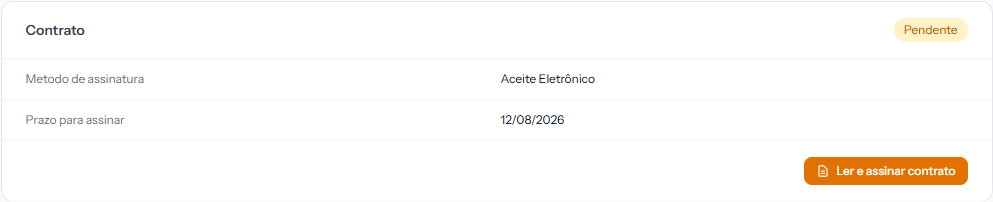 Inside the enrolment, the Contract panel shows the signature method and the deadline. The button is Read and sign contract. The screenshot is from the Portuguese portal; the layout is the same in English.
"Click Read and sign contract." The button appears twice on the same screen — in the notice at the top and inside the contract panel. Both lead to the same place.
"Read it and confirm." What they find next depends on the method the school chose, and each has its own article.
What to say about each method
| If the contract is | Tell the student |
|---|---|
| Electronic acceptance | "Tick the box at the end and click Confirm acceptance." |
| Digital signature | "Sign with your finger in the white box and click Confirm signature." It comes out far better on a phone. |
| Physical signature | "Click Download PDF, print it, sign it, photograph it and come back here to upload." |
After signing
The contract label changes to Signed immediately, and the Download PDF button appears — that is how they keep their own copy.
The student receives no email confirming electronic acceptance or a digital signature. If they ask for written confirmation, issue the Acceptance Receipt from the panel and send it. Logged for correction.
Two things they will ask
"Do I need to print it?" Only for a physical signature. On the other two, no — and the download button only appears after signing.
"Does it really count?" It does. The system records the date, time, IP address and device used, and freezes the contract text at the moment of signing. That set is the proof, and it comes out as its own document when anyone asks.
If something goes wrong
"There is nothing to sign." They may be on the wrong enrolment, or it is already signed. If everything vanished and only the text is left, the deadline has passed — see the diagnosis article.
"The button is dim." The box is unticked, the signature undrawn, or no file chosen, depending on the method.
"I cannot get into the portal." The problem comes before the contract. Start with the access article.
Reviewed on · view as plain text