
What you will get
An understanding of what EduPay does on its own when a student pays — so you do not redo by hand what is already done, and so you know where to look when somebody asks.
The bank notifies the system as soon as the payment is recognised. From there, four things happen in sequence, with no action from the school.
The four things
1. The installment is settled. The status changes to Paid and the payment date is recorded — the date the money actually arrived, not today's. This applies to slips, PIX and card; on a card payment, it also shows how many instalments the student chose, as Paid in 3x via card.
2. The student gets the confirmation by email. They do not need to send a receipt to the front office, and you do not need to confirm anything to them.
3. Whoever administers the account gets the notice that money came in, with the installment and the amount.
4. If that was the last open installment, the whole enrollment turns Completed. A cancelled enrollment is the exception: it does not turn completed even with everything paid, because settling the debt does not undo the cancellation. The payment is still recorded on the installment, and the school decides whether to refund the money.
And when the school uses the class-environment integration, a student who had lost access because of arrears gets it back — as long as nothing else is left open. On an enrollment that came from the online sale, it is the first payment that grants access to the class environment.
How to tell it worked
The installment shows Paid with the date, and the Manual record mark does not appear. That mark only exists on settlements done by hand; its absence is the clue that the money came in through the system's own route.
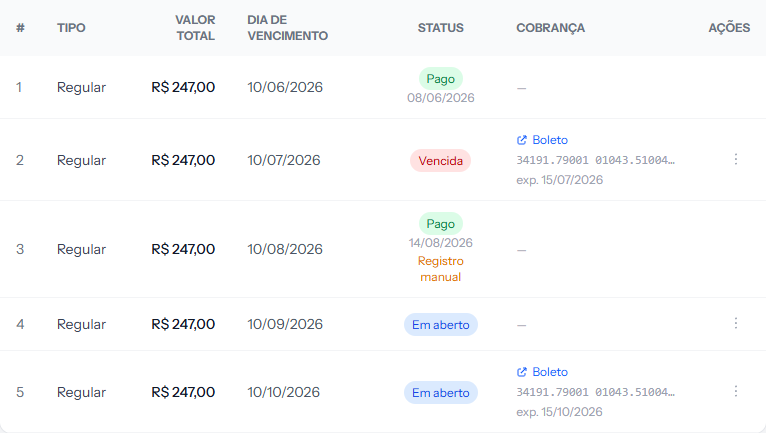 Installment 1 was settled by the system; number 3 was settled by hand. The difference is the Manual record mark, in orange.
If something goes wrong
The installment is still open after the payment. The bank's confirmation takes a few minutes, sometimes longer for payment slips. There is a dedicated article for that case, with what to do when it takes longer than that.
The student got the confirmation email but you did not get the notice. Check the spam folder of whoever administers the account. Both notices go out at the same moment, by different routes.
The enrollment did not turn Completed even with everything paid. Check whether an installment is left — the enrollment fee is easy to miss, because it sits at the top of the list and does not look like a monthly payment. If the enrollment was cancelled at some point, it deliberately does not turn completed.
Reviewed on · view as plain text