
What you will get
A course added to or taken out of an existing trail. It all happens on the trail's screen: Academic › Learning Trails, then View on the trail.
Linking an offering
At the bottom of the screen sits the Add offering to trail field. Pick one from the list and click Add.
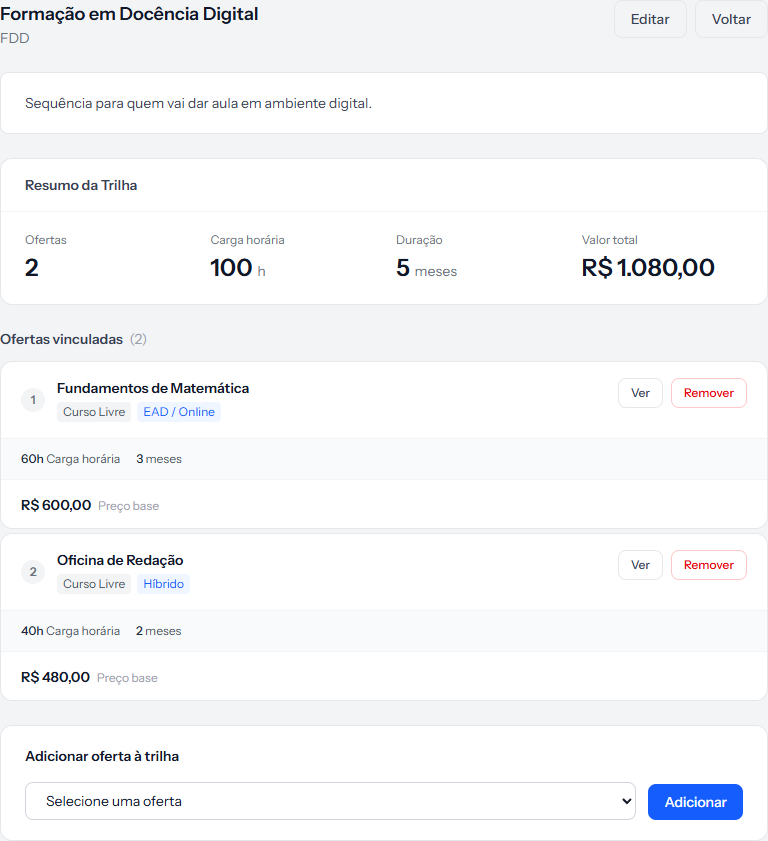 The new offering joins the end of the queue, with the next number. The summary panel at the top redraws itself immediately.
The picker only carries Active offerings not already in this trail. When none are left, the screen says All active offerings are already linked to this trail.
Unlinking an offering
The Remove button on the offering's row asks for confirmation and undoes the link.
Removing from the trail does not delete the offering. It stays in the registry, can still be sold on its own, and stays in any other trail.
What changes on enrolments already made
Nothing. An enrolment keeps the value, the contract and the instalments it was created with. Changing what a trail contains afterwards recalculates nothing, generates no new instalment and alters no signed contract.
In practice: the trail applies to sales from then on. Whoever already bought bought what was there that day.
If the change is big enough to make it a different product, the honest move is to create a new trail and deactivate the old one — that way the history stays readable.
The gap in the numbering
Remove an offering from the middle and the remaining numbers are not redone. A three-offering trail can end up showing 1 and 3.
It is presentation only and breaks nothing. If it bothers you, remove them all and link again in the order you want.
How you know it worked
The green banner says Offering linked successfully. or Offering removed from trail., and the four numbers in the Trail Summary panel already appear recalculated.
If something goes wrong
You removed the wrong offering. Just link it again — it comes back at the end of the queue, with a new number.
The total turned into "Partial value". One of the linked offerings has no base price. Fill in the price on the offering and the panel adds up again.
An offering vanished from the trail without you touching it. Check whether it was deleted under Academic Offerings — deletion takes the links with it.
Reviewed on · view as plain text