
What you will get
A settled understanding of the three words that turn up everywhere in the system. Mixing them up is what slows a school's setup more than anything else.
One sentence each:
- Academic offering — what you sell.
- Cohort — with whom and when the student studies.
- Trail — several offerings sold as one package.
The offering is the product
The course, the school year, the module, the workshop. It lives under Academic › Academic Offerings.
It holds what describes the product: name, type, modality, workload, duration and base price. It holds no students and no start date — that is the cohort's job.
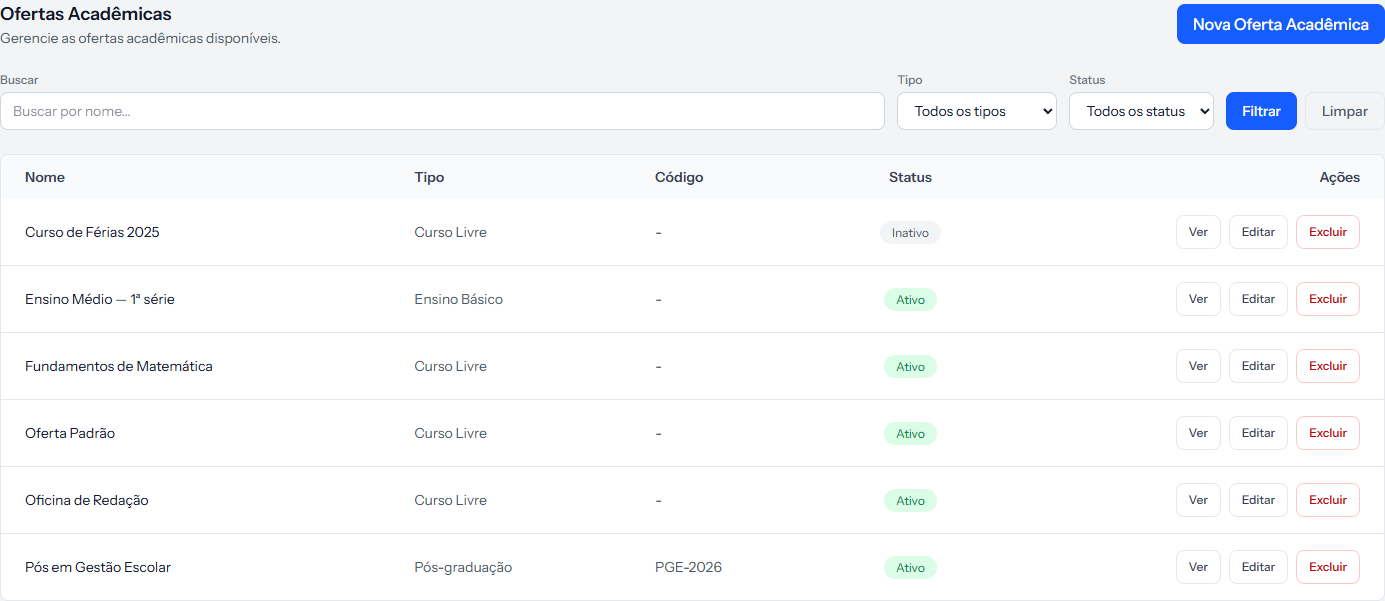 Each row is a product the school sells. The Tipo column separates postgraduate, undergraduate, K-12 and free courses.
The cohort is the group with dates
It lives under Students › Cohorts. It holds a name, an intake period, a start date, an end date and a status.
A cohort does not belong to an offering. They are independent: the same cohort can take students from different courses, and the same course can have ten cohorts. What brings the two together is the enrolment.
This usually surprises people, because it feels natural for "2026.1 cohort of the Management postgrad" to be a child of the course. In EduPay, that connection exists only in the name you give the cohort.
The trail is the package
It lives under Academic › Learning Trails. It gathers several offerings and sells them together, with a sequence and an added-up value.
It is for full programmes, study plans, bundles. If your school sells one course at a time, you can ignore trails — they are optional.
Where the three meet
None of them charges anything on its own. The enrolment does, and that is where the pieces come together:
| The enrolment picks | Where it comes from |
|---|---|
| The student | Students |
| The product: one offering or one trail | Academic |
| The cohort | Students › Cohorts |
| The price table | Contracts › Financial Plans |
| The contract template | Contracts › Contract Templates |
Instalments are born from the enrolment.
Two student lists that never talk to each other
This is the detail that causes the most confusion once everything is set up.
There are two ways a student can be tied to a cohort, and they are independent:
- The cohort's list — whoever you add on the cohort's own screen, or whoever arrives through a spreadsheet import. It is what the No. of Students column counts.
- The cohort chosen on the enrolment — the cohort field inside an enrolment.
Neither feeds the other. A cohort can show 0 students on the list and still have dozens of enrolments pointing at it.
The cohort's list is for organising the school and for the class environment. The enrolment's cohort is what counts for the contract and for syncing.
How you know it worked
You can answer without hesitating: "what I sell" is the offering, "when and with whom" is the cohort, "a bundle of several" is the trail. And you know none of the three charges anything without an enrolment.
If something goes wrong
You created a cohort and it does not show up on the enrolment. Only cohorts with the status Open are offered.
You are looking for the cohort's seat count. It does not exist. The system does not track capacity — the school does.
You are unsure whether you need trails. If each student buys one course at a time, you do not. Trails only pay off when the whole package is the sale.
Reviewed on · view as plain text