
What you will get
An understanding of the message This student already has an active enrollment for this product. and which route fits your case.
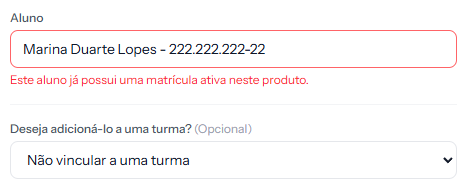 The message appears under the student field in step 1, after trying to save. The rest of the form stays filled in.
The rule, in one sentence
A student cannot have two enrolments in progress for the same product. The system checks on save and refuses.
What counts as "in progress": enrolments that are neither cancelled nor completed.
What the rule allows
It is narrower than it looks, and that is deliberate:
| Situation | Allowed? |
|---|---|
| Same student, different products | Yes |
| Same student, same product, different cohorts | No |
| Same student, same product, the previous one cancelled | Yes |
| Same student, same product, the previous one completed | Yes |
The second row usually surprises people. The cohort does not count: what the system compares is student plus product. If the school needs the same student in the same course across two cohorts at once, the route is two separate offerings.
The four routes when the message fires
1. It is the same enrolment, made twice. Someone already enrolled them. Search the list by the student's name and check before doing anything.
2. The student is coming back after leaving. The previous enrolment has to be cancelled. Cancel it and make the new one — the old stays in the history.
3. It is a new period of the same course. Then the product should be a different one: English 2026 and English 2027 are two offerings. Putting the year in the offering's name settles it, when the course genuinely repeats by period.
4. There are two records for the same person. If the student was registered twice, the guard does not catch it — each record is a different student to the system. There the problem is the duplicate record, and it belongs there.
In batch enrolment
Enrolling a whole cohort, the guard applies too. The system stops before enrolling anyone and shows who already has an active enrolment for that product.
On confirmation, it enrols everyone else and skips those. The closing message counts both numbers — how many were made and how many were skipped for conflict.
It is the safest possible behaviour: you see the list before deciding.
How you know it worked
The enrolment saves normally. Opening the student's record and searching their name under Contracts › Enrollments, there is one enrolment in progress per product — and the older ones, if any, read Cancelled or Completed.
If something goes wrong
The message fires and you cannot find the earlier enrolment. It can be in any status that is not cancelled or completed. Search the student's name with the status filter on All.
You want two identical enrolments on purpose. The system will not allow it. If the case is legitimate — two cohorts of the same course, say — the route is to split into two products.
The student appears twice on the student list. Then the problem is the duplicate record, and the enrolment guard does not protect against that.
Reviewed on · view as plain text