
What you will get
An understanding of what happens to an enrolment when the student simply does not sign — and a decision on whether the school wants it to fall on its own.
Where the deadline comes from
From the contract template. Its signing-deadline field counts calendar days from the enrolment. Blank means no deadline, and the contract waits forever.
The deadline shows on the templates list, in brackets, and on the new enrolment's panel.
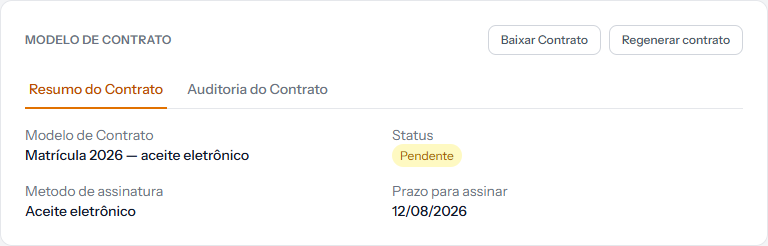 On the enrolment, the deadline appears as a date — the day the contract expires. On the template, the same field is a number of days.
What the daily routine does
Once a day, the system looks for contracts still pending whose deadline has passed. Each one is marked Expired.
From there, what happens to the enrolment depends on a switch under Settings › Contracts:
| The automatic cancellation switch | What happens |
|---|---|
| Off | Only the contract becomes Expired. The enrolment carries on waiting, and the instalments carry on existing |
| On | The enrolment is cancelled, every open and overdue instalment is cancelled, and the student gets the cancellation email |
Note one important difference: on cancellation by expiry, every instalment is cancelled — including the overdue ones. That is not the same as cancelling by hand, where overdue ones can become outstanding debt.
The charges on those instalments are cancelled too, under the same rule as cancelling by hand: PIX and card links are withdrawn immediately, but a slip still within its validity cannot be cancelled before its due date and stays payable until then. If the student pays, the payment is recorded on the instalment, the enrolment stays Cancelled, and it is up to the school to decide whether to refund the money.
Which to choose
Leave it off if the school tends to chase the student by phone. The enrolment sits waiting and you handle it case by case.
Turn it on if the volume is high and the school prefers a clean queue. An enrolment nobody signed within N days gets out of the way by itself.
There is no automatic middle ground. If you want to warn before cancelling, the warning is manual work, watching the pending-signatures queue.
Watching before it expires
Contracts › Pending Signatures is the screen for that. It gathers whoever has not signed, and it is the place for the phone call before the deadline runs out.
Worth a weekly routine, all the more with automatic cancellation on.
How you know it worked
With the switch off, the contract reads Expired and the enrolment stays on the list, waiting. With it on, the enrolment reads Cancelled and the student got the email.
If something goes wrong
The contract expired and you wanted to give more time. The deadline belongs to the template and runs from the enrolment. A specific contract cannot be extended — the way out is to cancel and redo the enrolment.
An enrolment was cancelled automatically and you did not expect it. The switch is on under Settings › Contracts. It applies to every enrolment.
You want no deadline at all. Leave the template's signing-deadline field blank. With no deadline, nothing expires.
Reviewed on · view as plain text