
What you will get
An understanding of how a student crosses from EduPay into the class environment — and why, when they do not, it is nearly always the same thing missing.
The short answer: what carries the student is the cohort, not the course.
The path, in three steps
- The EduPay cohort holds the Moodle cohort ID.
- The enrolment adds the student to that cohort on the other side. When the school does the enrolling, that happens as the enrolment is created. When the student buys through the catalogue, it happens on the first payment — or right away, if the course has nothing to pay.
- Moodle itself, through its own cohort sync, enrols the student in the courses attached to that cohort.
EduPay enrols nobody in a course. It puts the person in the cohort, and course enrolment is Moodle's job.
The two fields that look like they do the same thing
| Field | Where it lives | What it does today |
|---|---|---|
| Moodle cohort ID | On the cohort | This is the one. Without it, nothing syncs |
| Moodle course ID | On the offering | Nothing. It is a note |
Filling in the ID on the offering and expecting the student to show up in the course is the most common mistake. It is stored, it appears on screen, and no routine uses it.
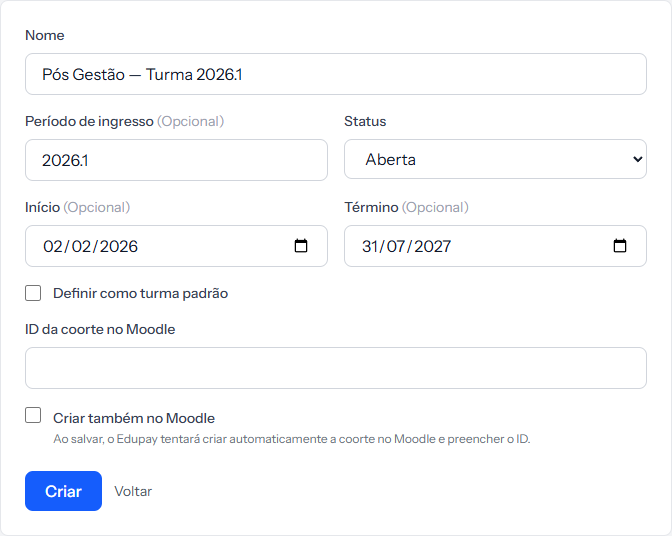 The two fields at the bottom are the ones that matter: ID da coorte no Moodle and the Criar também no Moodle checkbox. They only appear once the class environment is connected.
The three conditions
For an enrolment to reach the class environment, all three must hold at once:
- The integration is active under Integrations › LMS Platforms.
- The enrolment has a cohort picked. With no cohort, EduPay does not even try.
- The cohort has its Moodle cohort ID filled in.
If any one fails, the student is enrolled normally in EduPay — contract, instalments, portal, all working — and simply does not cross to the other side.
The easy way to fill in the ID
When creating the cohort, tick Also create in Moodle. EduPay creates the cohort over there and brings the ID back filled in.
When that does not work, it says so: Cohort created, but Moodle cohort creation failed. Please link the ID manually. The cohort exists; only the ID is missing, and you fill it in under Edit.
The cohort's list and the enrolment
Worth repeating, because it is where diagnosis usually goes astray: what carries the student into the class environment is the cohort picked on the enrolment, not the student list on the cohort screen.
Adding someone to the list organises the school. The enrolment is what triggers the sync.
How you know it worked
On the enrolment screen, the Moodle sync field stops showing Not configured. If something jams, the Resync Moodle button at the top of the same screen tries again.
If something goes wrong
The enrolment says "Not configured". Walk the three conditions above, in order. It is almost always the second or the third.
The enrolment came from the catalogue and still says "Not configured". If the student has not paid anything yet, that is expected: a catalogue purchase only takes the student into the class environment on the first payment, whether it arrives automatically or is recorded with Mark as Paid.
The student joined the cohort but appears in no course. That one is on Moodle's side: the cohort has to be attached to the courses, through its own cohort sync.
You changed the enrolment's cohort. The sync does not follow on its own. Use Resync Moodle after changing it.
Reviewed on · view as plain text