
What you will get
Knowing what happens when you change a cohort's status — and what does not happen, which is the part that surprises people.
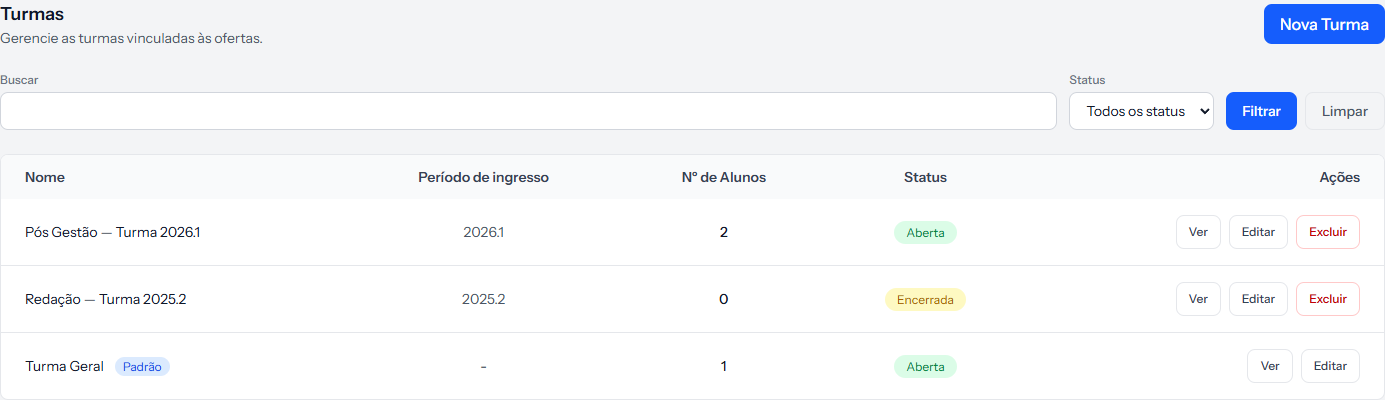 Look at the third row: Turma Geral carries the Padrão tag and, in the actions column, has no Excluir.
What each status does
| Status | What changes |
|---|---|
| Open | The cohort is offered when you create an enrolment |
| Closed | The cohort leaves the picker on the enrolment |
| Archived | Exactly the same as Closed |
Closed and Archived do the same thing. The system only tells "open" from "not open"; the difference between the two is your own filing, to separate the cohort that ended this year from one that ended five years ago.
What none of the three does
Changing the status touches nothing beyond the picker:
- It does not remove students from the cohort's list. The list stays as it is.
- It does not end enrolments. Enrolments pointing at that cohort stay active.
- It does not stop charging. Instalments keep being created and falling due.
- It does not remove the student from the class environment.
Closing a cohort is a tidying gesture, not a financial operation.
The default cohort
One cohort per school can carry the Default tag. It comes pre-set on Turma Geral, created along with the account.
What the tag does today: it blocks deletion. Its row on the list has no Delete button, and trying by another route answers Cannot delete the default cohort.
Marking another cohort as default unmarks the previous one automatically, without asking.
Deleting a cohort
Only the school owner can delete. The same caution as offerings applies: deletion does not check whether enrolments point at that cohort, and there is no undo from the screen.
Closing solves it almost every time. Save deletion for the cohort created by mistake.
How you know it worked
After closing, create a test enrolment and look at the cohort list: the closed one is no longer there. Nothing else needs to change — and it is precisely because nothing else changes that closing is safe.
If something goes wrong
You closed the cohort and the charges keep coming. That is how the system behaves. Charging is settled through the enrolment.
You cannot find the Delete button on a cohort. Either it is the default cohort, or you are on the team — deleting belongs to the account's owner.
The cohort disappeared from the list. Check the Status filter at the top of the screen; under All statuses they all appear.
Reviewed on · view as plain text