
What you will get
Knowing exactly what the student read before calling you. These emails go out signed with your school's name, and the person on the other end holds you to what they say.
There are four, and all of them go to the student's email address.
| When it goes out | Subject the student sees |
|---|---|
| Boleto issued | Your boleto is ready |
| PIX charge issued | Your PIX code is ready |
| Card link sent | Your payment link is ready |
| Second copy generated | New charge generated — second copy available |
Your school's name follows the subject, exactly as it is in Settings. All four carry your logo at the top and your contact details in the footer.
Boleto issued
Fires when the boleto is generated — when the enrollment is created, for whatever already falls due within the configured lead time (the enrollment fee, for example); when someone at the school issues it from the installment menu; and when the morning routine issues it on its own, including the new boleto that replaces one that expired unpaid. It is the most frequent of the four.
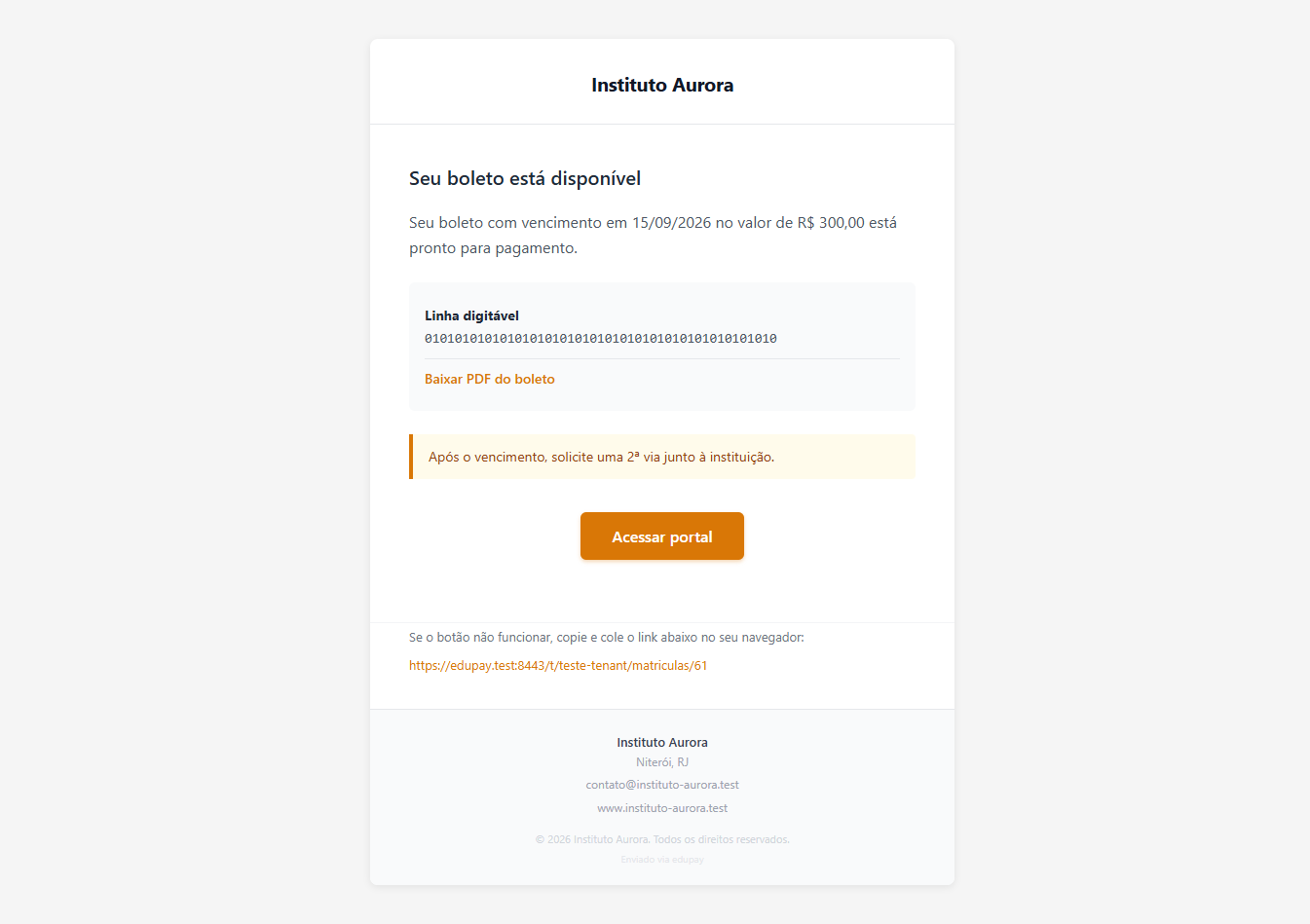 The barcode is written into the body of the email, not just in the attachment. That is deliberate: the student copies it from there and pays through the bank app without opening anything else.
What it carries: the amount, the due date, the barcode, the Download boleto PDF link and the Access portal button.
The footer holds the line that generates the most calls to the front desk: "After the due date, request a new copy from the institution." In other words, the email itself sends the student to you — worth having the team ready. For up to seven days after the due date, though, a boleto that expires unpaid is replaced on its own, and the student receives this same email with the new boleto.
PIX charge issued
Fires when the PIX charge is generated, when the enrollment is created, by hand or by the morning routine — which also replaces a PIX that expired unpaid. It carries the amount, the due date, the PIX code (copy and paste) and the Access portal button.
In the footer: "The PIX code expires on the due date. After that, request a new charge."
PIX depends on your school's receiving account accepting PIX. If it is not enabled there, no PIX charge is generated — and with no charge, this email does not exist. What decides this is the Accepted payment methods box, under
Integrations › Payment Gateway.
Card payment link
Fires when a card enrollment is created — a single email per enrollment — and when someone at the school generates the card link for an installment from the menu. If there is an enrollment fee, it does not get an email of its own: it shows up in the same one, on the line "Also open in the portal", with its amount.
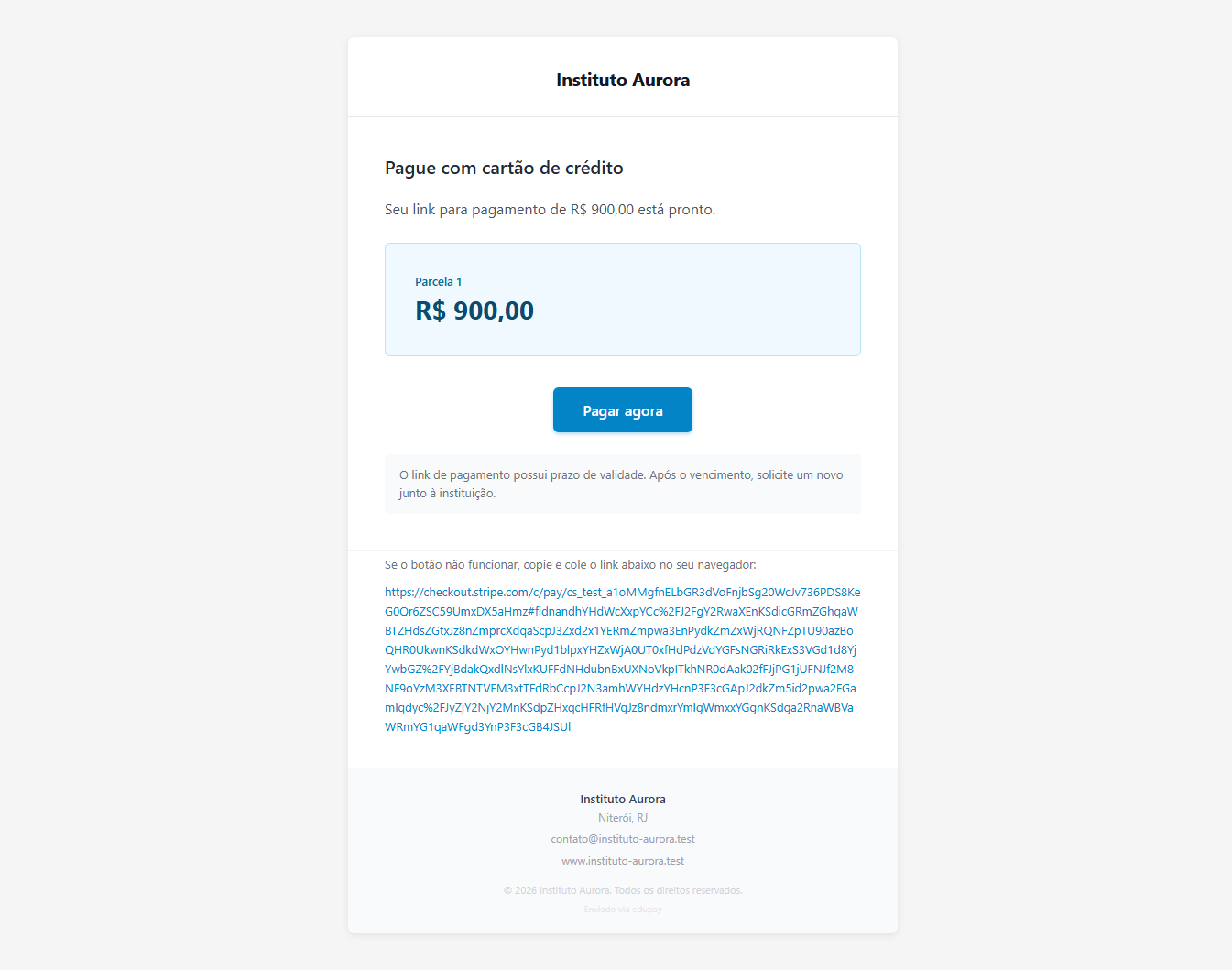 The address under the button is there for the student whose email client blocks buttons — they copy and paste it into the browser.
The Pay now button leads to the student portal, not straight to the payment screen. There, the Pay with card button opens a valid payment on each click — which is why the email does not go stale. The footer says exactly that: "The button opens the student portal, where card payment stays available while the installment is open."
Second copy generated
Fires when the school issues the second copy of an installment. It is the only one of the four that talks about two charges at once, and the footer is the important part: "The previous charge has been cancelled. Use only this new charge to make your payment."
It carries the new amount and the new due date — which may differ from the originals, because whoever issues the second copy decides both.
When the second copy is boleto or PIX, the student gets only this email. The "boleto issued" notice is suppressed on purpose, so they do not receive two messages in a row and pay the wrong one.
What these emails never do
- They do not press. None of them threatens, none mentions credit reporting, none mentions any deadline beyond the installment's own due date.
- They do not go to you. All four are for the student. What reaches the school owner is a different set of notices.
- They do not go out without an email address. A student with no email on file simply does not receive one — and the charge is issued all the same, silently.
If something goes wrong
The student says they did not receive it. Check the address on their record; a typo is the most common cause. Ask them to look in the spam folder. Meanwhile the charge is in their portal and you can pass the barcode along by phone or message.
The email arrived in another language. The language of these notices follows the installation's language setting, not each student's preference.
The student received two boletos. Check whether a second copy was issued. The second-copy notice says which charge is valid — the previous one was cancelled. If there was no second copy, the first boleto expired unpaid and the routine sent a new one: the most recent one is the valid one.
The email came without the logo. The logo is whatever is set in Settings. If it is empty there, the email goes out with the school name as text.
Reviewed on · view as plain text