
What you will get
Money questions answered with names attached: who owes, how much, since when.
The path is Reports › Financial Report.
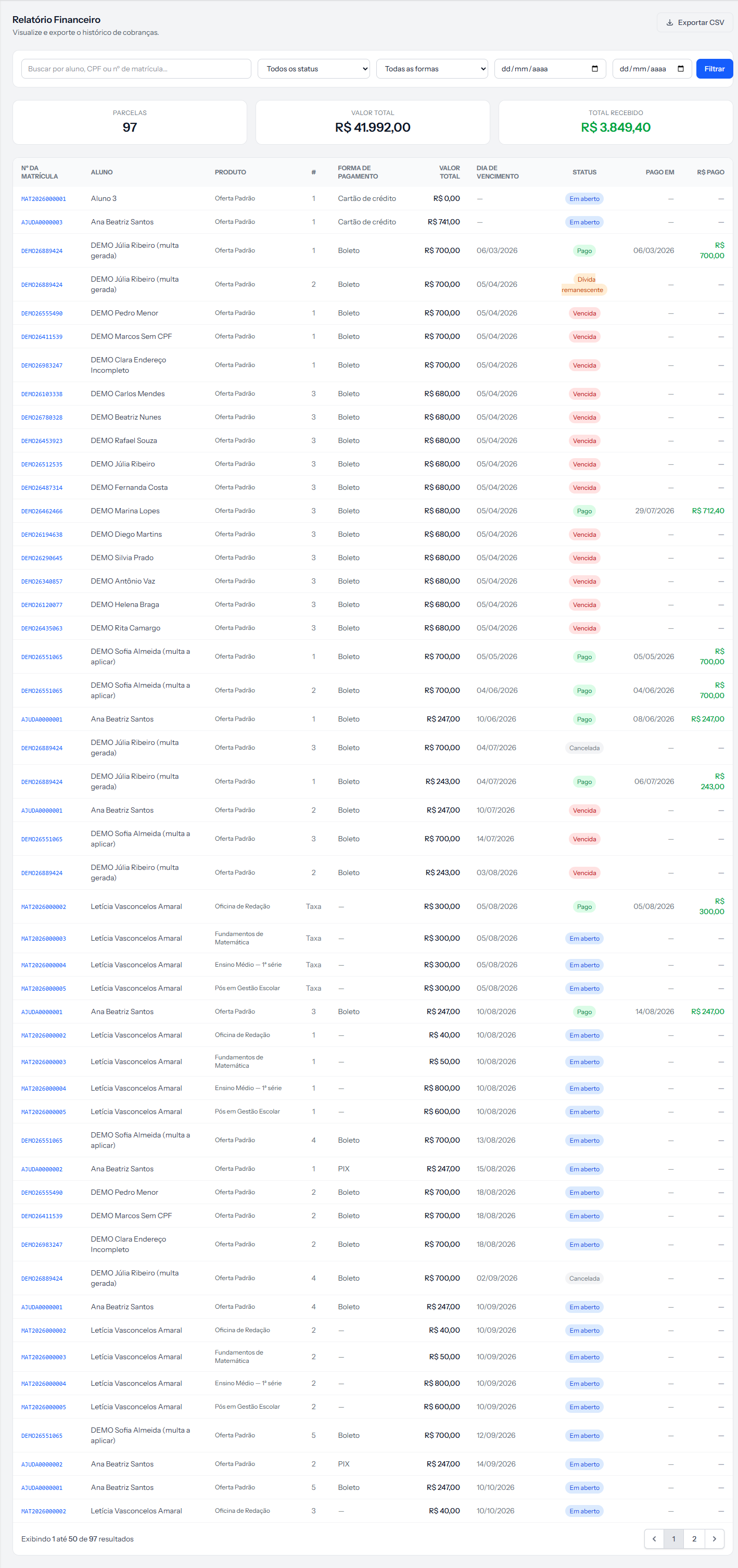 Filters at the top, three totals in the middle, and one row per instalment — not per enrolment. The screenshot is from the Portuguese panel; the layout is the same in English.
One row per instalment
That is the unit of the screen, and it changes how you read everything. A student with twelve instalments takes twelve rows. 97 instalments on the first card means 97 instalments, not 97 students.
The filters
| Filter | What it does |
|---|---|
| Search | Student name, ID number or enrolment number |
| Status | Open, Paid, Overdue, Cancelled, Waived — plus Remaining debt, if any exists |
| Method | Boleto, PIX, card |
| Two dates | The due date range |
They combine: overdue + boleto + August is a legitimate question and the screen answers it.
The trap is in the dates. They filter by due date, not by payment date. Filtering August brings what fell due in August, not what came in during August — and the two are rarely the same.
For "how much came in this month", filter by Paid and read the Paid on column row by row. There is no payment-date filter today.
A filter is missing from the screen
The report knows how to filter by cohort, but there is no cohort selector on the page. The filter exists underneath and only works for someone assembling the address by hand.
For a school with several cohorts, "how much does the morning group owe me" is a common question with no button. Logged for correction.
The columns
Enrolment number is a link — it goes to the enrolment. It is the fastest way out of the report and into action.
# carries the instalment number, or Fee when it is the enrolment fee.
Status is the coloured label. Paid on and Amount paid only have content on paid rows.
Export CSV
The button exports everything that is filtered, not just the page you are looking at. Filtered 97 instalments and seeing 50? The file comes with all 97.
The file opens in Excel with correct accents and uses a semicolon as the separator.
In the file, the Type and Status columns come out with the internal words —
regular,paid,open— rather than the names on screen. It differs from what you see here. Logged for correction; until then, it is worth replacing them in the spreadsheet after opening.
Three questions and how to answer them
"Who owes me?" Status Overdue, no dates.
"How much will I receive in September?" Both dates in September, status Open. The Total amount card answers it.
"Is this student up to date?" Type the name in the search and read the status column on their rows.
If something goes wrong
The totals do not match the panel. That is expected, and there is an article just about it — the two measure different things.
I filtered a month and got less than expected. The dates are due dates. An instalment paid in August but due in July does not enter an August filter.
The file opened with everything in one column. Excel used the wrong separator. Import it choosing semicolon.
Reviewed on · view as plain text