
What you will get
The full list, to consult while writing. You never need to type any of these codes: clicking the tag in the panel inserts it where the cursor is.
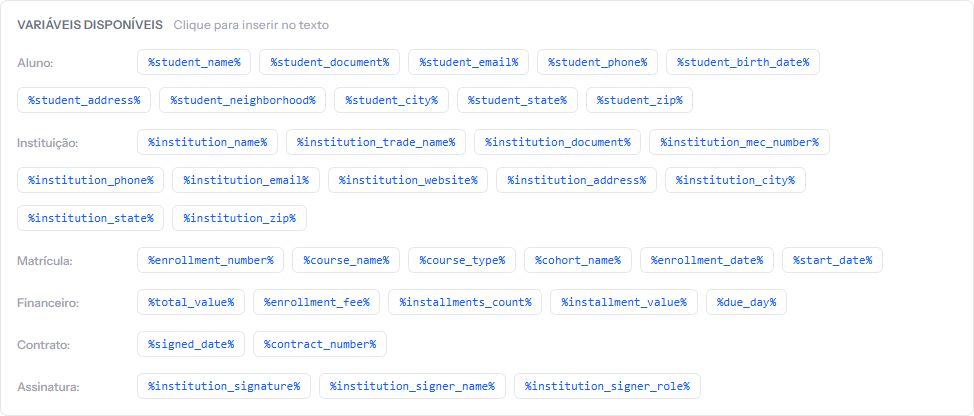 The panel's six groups are exactly the six on this page. What this page adds is the format column — what each variable actually prints.
Student
| Variable | What it prints |
|---|---|
%student_name% |
Full name |
%student_document% |
ID, exactly as stored |
%student_email% |
|
%student_phone% |
Phone |
%student_birth_date% |
Date of birth, as 15/03/1995 |
%student_address% |
Street and number only |
%student_neighborhood% |
Neighborhood |
%student_city% |
City |
%student_state% |
State, two letters |
%student_zip% |
ZIP code |
Watch %student_address%: it brings only street and number. Neighborhood,
city and state have their own variables, and you assemble the full address in the
text.
Institution
| Variable | What it prints |
|---|---|
%institution_name% |
Legal name |
%institution_trade_name% |
Trading name |
%institution_document% |
The school's tax ID |
%institution_mec_number% |
Ministry of Education code |
%institution_phone% |
Contact phone |
%institution_email% |
Contact email |
%institution_website% |
Website |
%institution_address% |
Full address, already assembled |
%institution_city% |
City |
%institution_state% |
State |
%institution_zip% |
ZIP code |
They all come from Settings › General. Empty there, empty in the contract.
Note the difference: the institution's address comes pre-assembled; the student's does not.
Enrollment
| Variable | What it prints |
|---|---|
%enrollment_number% |
The enrolment number |
%enrollment_date% |
Enrolment date, as 19/02/2026 |
%course_name% |
Name of the course or trail |
%course_type% |
The internal type code, not the name |
%cohort_name% |
Cohort name |
%start_date% |
The cohort's start date |
%course_type% deserves attention. It prints the internal key —
free_course, postgrad, school — not Free Course or Postgraduate. In a
contract that reads badly. Write the type by hand or skip the variable.
%cohort_name% and %start_date% come out empty when the enrolment has no
cohort picked. If your text depends on them, make the cohort mandatory in your
process.
Financial
| Variable | What it prints |
|---|---|
%total_value% |
The total with the currency symbol |
%enrollment_fee% |
The fee with the symbol, or a dash if there is none |
%installments_count% |
The number of instalments — on card, always 1 |
%installment_value% |
The instalment amount with the symbol — the first one's; on card, the full amount |
%due_day% |
The word "dia" plus the number — "dia 10" |
The three money variables already carry the currency symbol. Never write
R$ %total_value% — it would come out as "R$ R$ 4,800.00".
%due_day% already carries the word "dia". Never write dia %due_day% — it
would come out as "dia dia 10". This is the most common mistake, and the article
next door shows where it hides.
When the split does not come out even, the last instalment takes the leftover
cents. R$ 1,000.00 in 3 prints R$ 333.33 in %installment_value%, and the
third instalment comes out at R$ 333.34.
On card, the contract speaks of a single charge for the full amount. The
student picks how many instalments to pay in at payment time, with the card
issuer. That is why %installments_count% prints 1, %installment_value%
prints the total and %due_day% prints a dash. If your template's text talks
about monthly payments, it is worth keeping a separate template for card
enrolments.
Contract
| Variable | What it prints |
|---|---|
%signed_date% |
The date the contract was generated, not signed |
%contract_number% |
The same number as the enrolment |
The name %signed_date% misleads. It records the date the document was
created, at enrolment time. If the student signs five days later, the text still
carries the old date. For a closing line that is usually acceptable; for a clause
that depends on the real signing date, do not use it.
Institution signature
| Variable | What it prints |
|---|---|
%institution_signature% |
The signature image, if there is one |
%institution_signer_name% |
Name of whoever signs for the school |
%institution_signer_role% |
That person's role |
All three come from Settings › Contracts, and the article on the institution's signature explains how to fill them in.
How you know it worked
Open the Preview after writing. Every recognised variable appears highlighted in yellow, with a sample value. Anything left in red is a variable with no value — usually a mistyped code.
If something goes wrong
The variable appeared in the contract with its percent signs. The code is wrong. Check it letter by letter, or delete it and insert it again from the panel.
A variable came out empty. The data does not exist on the record.
%student_zip%stays blank if the student has no ZIP code;%institution_mec_number%, if Settings has no code.You want a variable that is not on the list. New ones cannot be created. Whatever is not here has to be written by hand in the template's text.
Reviewed on · view as plain text