
What you will get
Four mistakes avoided that do not show up while you write, do not show up in the preview, and do show up in the contract the family signs.
The cause is always the same: some variables already carry part of the text — the currency symbol, the word "dia" — and the preview shows them without that part.
The preview does not show everything the same
The Preview fills the variables with sample data. In four of them, the sample differs from what the real contract prints:
| Variable | The preview shows | The contract prints |
|---|---|---|
%total_value% |
4.800,00 | R$ 4.800,00 |
%enrollment_fee% |
300,00 | R$ 300,00 |
%installment_value% |
375,00 | R$ 375,00 |
%due_day% |
10 | dia 10 |
The preview stays useful for checking structure, clauses and mistyped variables. Just do not trust it to decide whether a currency symbol or the word "dia" is missing.
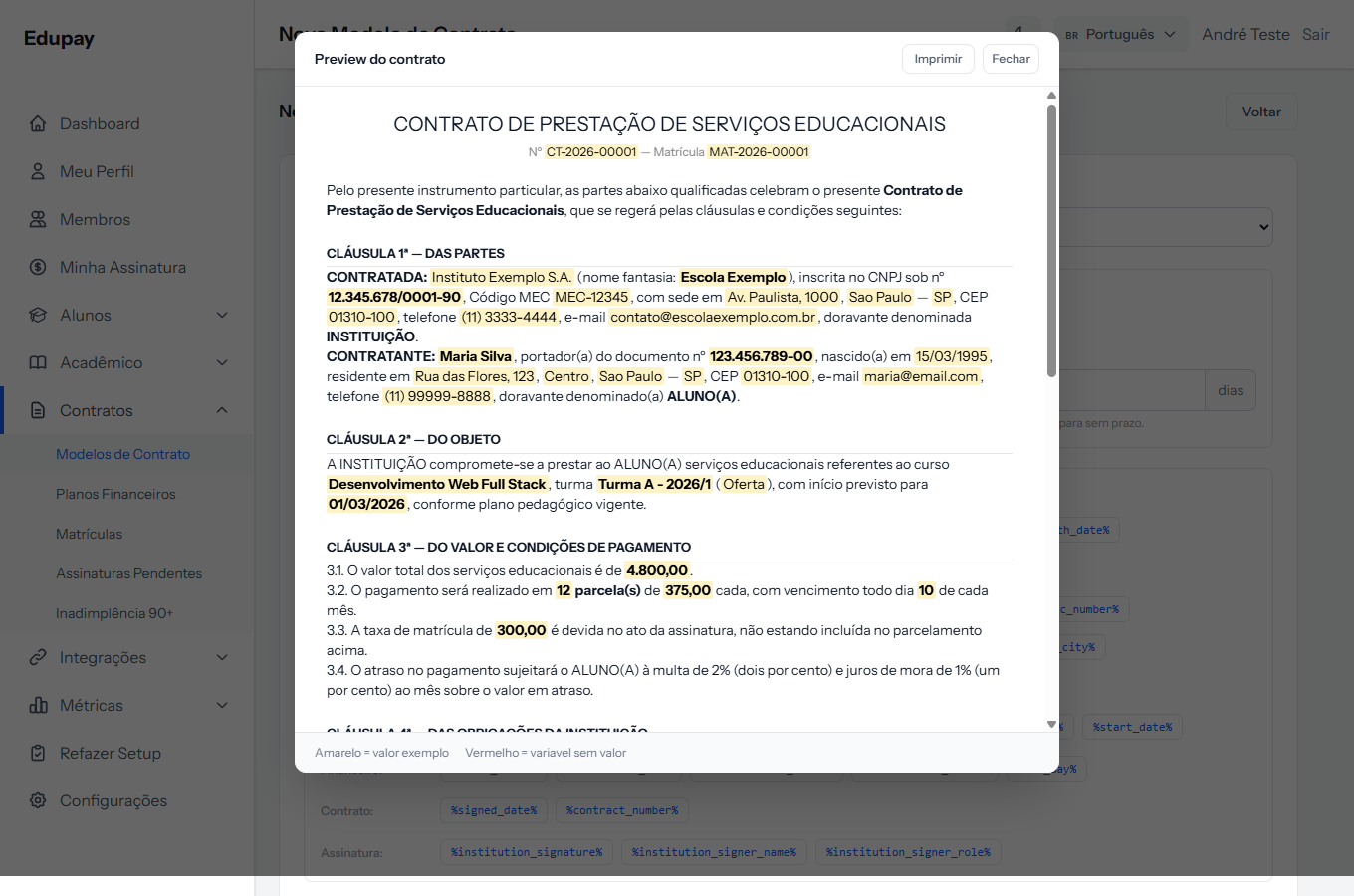 Look at clause 3.1: the amount shows as 4.800,00, with no symbol. In the real contract it comes out with R$ in front.
Mistake 1 · Writing the currency symbol before the amount
Seeing the preview without the symbol, the temptation is to write
R$ %total_value%.
What lands in the student's contract: R$ R$ 4.800,00.
It applies to all three money variables. Write the variable alone, with nothing before it.
Mistake 2 · Writing "dia" before the due day
Same trap: todo dia %due_day%.
What comes out: todo dia dia 10 de cada mês.
This mistake is in the default template the system offers. Clause 3.2 of the default template reads:
3.2. O pagamento será realizado em 12 parcela(s) de R$ 400,00 cada, com vencimento todo dia dia 10 de cada mês.
I checked it on a contract generated for real. If you used the default template, open your template under Edit and delete the word "dia" that comes before the variable — the correct phrasing is "com vencimento todo %due_day% de cada mês".
It is already logged for correction in the system's default template, but your template is a copy: fixing it there does not fix yours.
Mistake 3 · Using the course type
%course_type% prints the internal code — free_course, postgrad, school.
What comes out: turma Turma A - 2026/1 (free_course).
Write the type by hand in the text, or drop the variable. The default template needs this too.
Mistake 4 · Relying on data that may be missing
Variables turn into nothing when the record lacks that detail. That leaves holes in the text:
com início previsto para , conforme plano pedagógico vigente
It happened because the enrolment had no cohort, so %start_date% came out empty
— and the comma was left stranded.
The riskiest ones are %cohort_name% and %start_date% (they need a cohort
picked) and %student_zip%, %student_neighborhood% (they need an address).
Write the sentences so an empty field does not break the reading, or make those records mandatory in your process.
How you know it worked
The definitive check is a test enrolment: create one with an invented student, open the generated contract and read the amount and date clauses. It is the only way to see the text exactly as the family will. Then cancel the test enrolment.
If something goes wrong
You have already issued contracts with "R$ R$" or "dia dia". Contracts already generated are frozen copies and do not fix themselves. Fix the template for the next ones, and rebuild the document for enrolments not yet signed with the regenerate-contract button on the enrolment screen.
The preview is right and the contract is wrong. Expected, for the four variables in the table above. Beyond those, check whether you edited the template after that contract was generated.
The amount came out with no symbol at all. That is the opposite case: someone deleted the variable and typed the number by hand.
Reviewed on · view as plain text