
What you will get
The finished contract in front of you before any student signs. There are two checks, and both are worth doing — because each catches what the other misses.
Check 1 · The Preview
The Preview button beside the editor opens the contract filled with invented data: Maria Silva, Instituto Exemplo S.A., a sample course, round amounts.
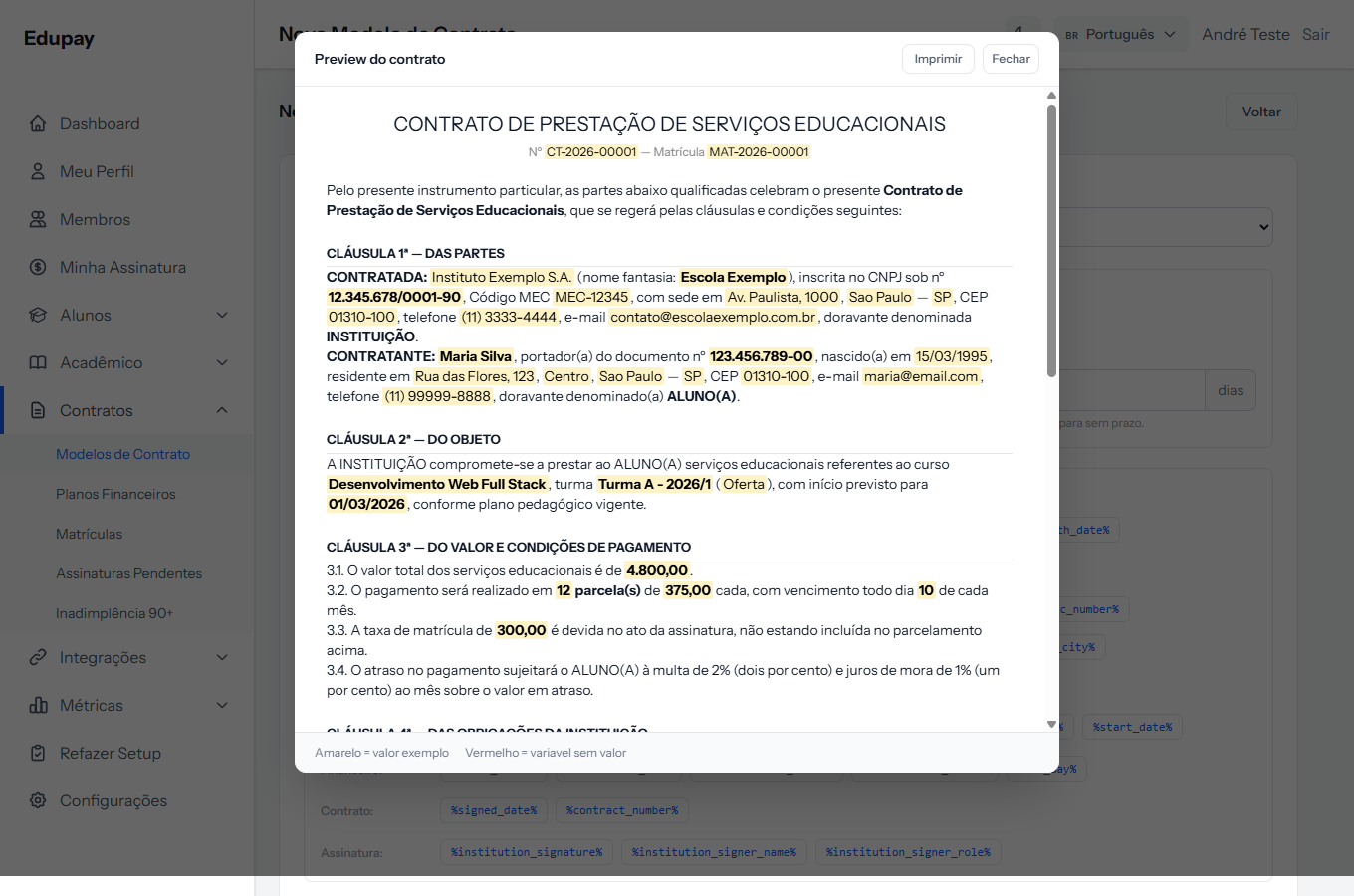 The window's footer carries the colour legend. Imprimir — print — sends the preview to the printer or to PDF, which helps for reviewing on paper. The window's own buttons are in Portuguese.
The two colours do the work:
- Yellow — a recognised variable, with a sample value. That is what you want to see.
- Red — a variable with no value. Almost always a mistyped code.
A visual sweep for red catches typing mistakes in seconds.
What the preview checks well:
- The clause structure and numbering.
- Whether every variable was recognised.
- Whether the formatting survived the paste from Word.
- Whether any information is missing from the text.
What it does not check: four variables appear in a different format from the real one. The formatting-mistakes article, next door, has the table.
Check 2 · The test enrolment
It is the only way to see the text exactly as the family will.
- Register an invented student, with a name that makes the test obvious.
- Create an enrolment with the template you want to check.
- Open the generated contract on the enrolment screen.
- Read the amount, instalment and date clauses carefully.
- Cancel the test enrolment.
Worth doing once per new template, and whenever you touch the money clauses.
The reading that beats both
Once the numbers check out, read the whole contract from the family's side. Not as the person who wrote it, but as the person about to sign it.
That reading is what catches the truncated sentence, the clause that came out too harsh, and the paragraph left over from the default template that makes no sense for your school.
How you know it worked
No red marks in the preview. On the test enrolment, the amount clauses carry the currency symbol exactly once, the due date does not repeat the word "dia", and there is no stranded comma where a detail should be.
If something goes wrong
The preview opens blank. The template has no content. Write the text or use Use default template.
Something shows in red and you see no mistake. Compare it letter by letter with the variables panel: a percent sign is missing, or there is a stray space inside the code.
You cannot delete the test enrolment. Enrolments are cancelled, not deleted. That is why the test student's name needs to be recognisable.
Reviewed on · view as plain text