
What you will get
A link where the student pays by credit card. Most of the time you do not need to generate anything: when a card enrollment is created, the link goes out on its own and the student gets an email. The steps below are for the installment that was left without a charge.
Before the steps, understand the installment
A card enrollment has one single installment. It carries the full amount of the course and falls due three days after the enrollment (or after the billing start, when that is later). That is the deadline for the student to pay.
This tends to alarm anyone opening such an enrollment for the first time and seeing a single high-value row. It is not a mistake. The instalment plan does exist, but it happens on the student's card statement — the card issuer splits it, not the school. For the school it is a single charge, and the money arrives in one go.
If the deadline passes without payment, the installment becomes Overdue like any other, and the student gets the overdue notice.
When the link goes out on its own
When a card enrollment is created — from the panel, through a catalog sale or through bulk enrollment, the latter a few moments later — the system generates the link right away and sends a single email to the student. If there is an enrollment fee, it shows up in the same email, on the line Also open in the portal.
The email button does not open the payment page directly: it takes the student to the portal, where the Pay with card button is. The card payment page is valid for 24 hours, and the portal opens a new one on each click once the previous one has expired. So the student is never left without a way to pay if they open the email late.
When to generate it from the panel
The Card Link option only appears on the menu of a card installment that has no charge yet. In practice, that happens in three cases:
- The automatic issuing failed. The school owner gets the charge failure email.
- The charge was cancelled. The installment gets the Charge cancelled on… badge and is not billed again on its own.
- The installment's method was switched to card with the Change to Credit card option, on the same menu. The switch sends no email: the student can already pay through the portal, and Card Link is how you let them know.
Step by step
1. Open the student's enrollment, under Contracts › Enrollments.
2. Scroll down to the installments panel. On a card enrollment, the course row is a single one.
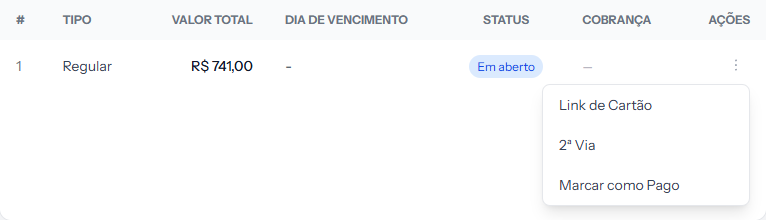 A single row, the full amount. It is not a mistake: that is how a card enrollment is born.
3. Click the three dots at the end of the row, in the ACTIONS column.
4. Click Card Link.
How to tell it worked
The link appears at the top of the screen right after you generate it, ready to copy. The CHARGE column on the installment starts showing a link, and the student receives the email with the button that leads to the portal. If the installment had the Charge cancelled on… badge, it disappears.
The on-screen link opens the payment page directly, which is why it is only valid for 24 hours. To send something by message after that, pass on the portal address: there, the Pay with card button always opens a valid payment.
If something goes wrong
The menu has no Card Link. Either the installment already has a charge — the link went out on its own when the enrollment was created, and the CHARGE column already shows it — or the installment is not a card one. In that second case, if it has no charge yet, the menu offers Change to Credit card when the school's receiving account accepts cards.
The student says the card was declined. The decline happens at the student's bank, and the school does not get the reason. Ask them to try another card through the Pay with card button, on the portal. The button stays valid while the installment is open.
The student paid and the installment is still open. Wait a few minutes. The bank's confirmation is not instant.
Reviewed on · view as plain text