
What you will get
To stop hunting. The left-hand menu has four loose items at the top, five groups that expand, and two loose items at the bottom.
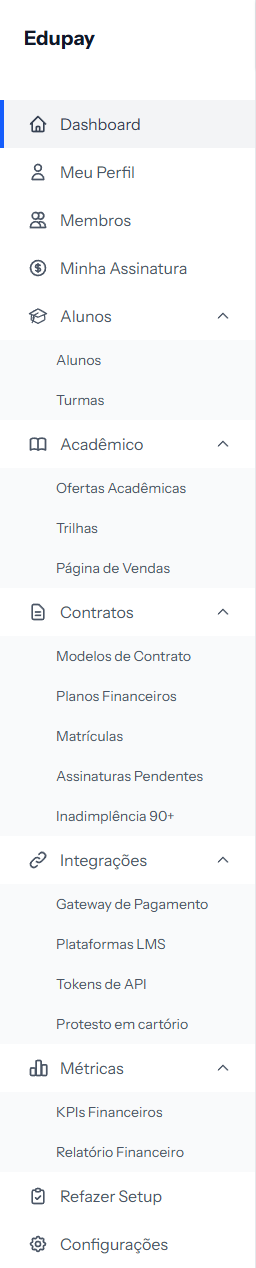 Groups expand and collapse on click. This picture shows them all open at once.
At the top: your account
| Item | What for |
|---|---|
| Dashboard | The home screen, with the current summary |
| My Profile | Your details, your email and your password |
| Members | The team members who have access |
| My Subscription | Your EduPay plan and its billing |
Students
| Item | What for |
|---|---|
| Students | The register of people |
| Cohorts | The groups, with start and end dates |
Academic
| Item | What for |
|---|---|
| Academic Offerings | What the school sells |
| Learning Trails | Offerings bundled as a package |
| Sales Page | The public page that enrolls on its own |
Contracts — where the money lives
The most used group day to day.
| Item | What for |
|---|---|
| Contract Templates | The contract text, written once |
| Financial Plans | The price tables |
| Enrollments | The enrollment list, and where each one's installments live |
| Pending Signatures | Contracts generated and not yet signed |
| Delinquency 90+ | Old debts, for collection through a registry office |
Integrations
| Item | What for |
|---|---|
Payment Gateway |
The account that receives the students' money |
| LMS Platforms | The link to the class environment |
API Tokens |
Links to other systems, for whoever handles the tech |
| Debt protest | The service for collecting old debts |
Metrics
| Item | What for |
|---|---|
| Financial KPIs | The month's numbers: expected against received |
| Financial Report | The installment list, with filters and export |
At the bottom: two for maintenance
| Item | What for |
|---|---|
| Redo Setup | Reopens the initial setup wizard |
| Settings | Everything the wizard asked, and a bit more |
A reading tip
The menu follows the same line as the system: who studies (Students), what is studied (Academic), what ties the two together with money (Contracts), what connects to the outside (Integrations) and what shows the result (Metrics).
When you do not know where to look, ask "is this about a person, a product, money or a connection?" — the answer usually gives you the group.
If something goes wrong
An item listed here does not appear in my menu. Some screens belong only to whoever administers the account. If you are a team member, they do not exist for you.
I cannot see Delinquency 90+. This is the only screen that depends on an outside service: it exists only after the school connects its registry account, under Integrations › Debt protest. Without that connection it appears for nobody — not even for whoever administers the account.
The screen disappeared out of nowhere. Not the case for Delinquency 90+: if the registry connection drops, the screen stays in the menu, with a notice explaining what happened. It only goes away when somebody disconnects on purpose.
The group does not open when I click. Click the group's name, not the icon.
I cannot find a screen that used to be there. Check whether the group is collapsed — the menu remembers each one's open or closed state.
Reviewed on · view as plain text